
Article
5 min read
600+ Organizations Used Our AI Analytics Copilot in Its First Two Weeks

Author
João Caetano
Last Update
October 14, 2026

Table of Contents
Why we built it
From the chat to the editor
Who owns what?
What do the agent and the editor agree on?
Dashboards
How we keep it working
What's next
by João Caetano, Elijah Evans, João Vitor Moreira, and Abdurrezak Efe
How the Analytics Copilot in Deel AI turns a chat answer into an editable report, who owns what between you, the Copilot and the editor, and how the same agent edits reports and dashboards.
More than 600 organizations used the Analytics Copilot in Deel AI in its first two weeks, and about four in ten requests to the analytics agent now come from inside the report editor rather than the chat. Here's what the Copilot does, and why it can't change a report without your click.
Suppose you want to know which departments in your company are the largest. Open the Deel AI chat in Deel, type "Show me headcount for our 4 largest departments as a bar chart", and press Enter. A few seconds later you get the chart, with a short summary of what it shows.
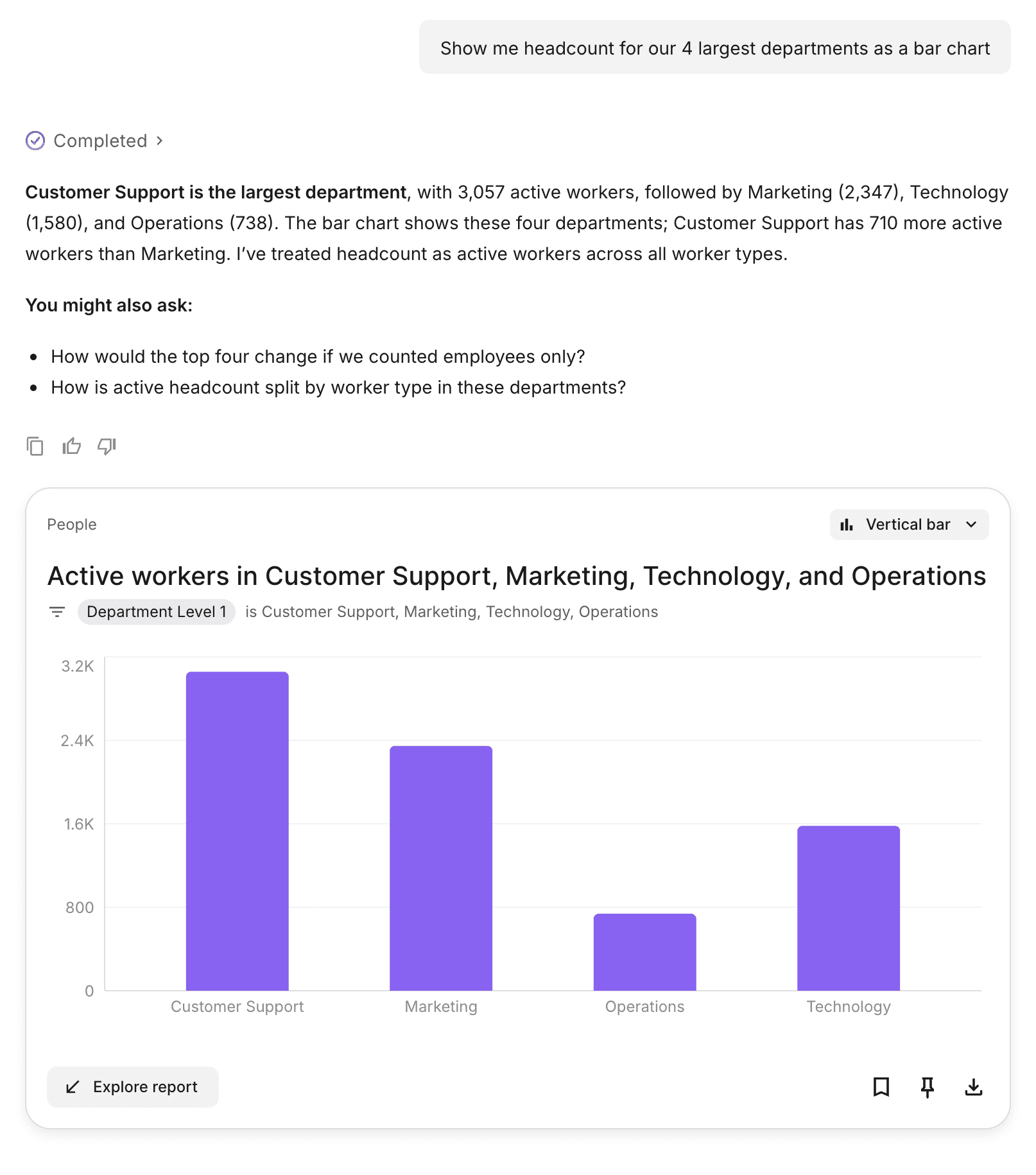
You type "Show me headcount for our 4 largest departments as a bar chart" (top right) and Deel AI answers with a live report: a bar chart of the four largest departments
That chart is a real report, not a picture. You can save it, share it, or add it to a dashboard. To change it, keep chatting, or click Explore report. That opens the report in the editor, with your conversation in a panel beside it. There, you type the change, click Apply, and the report updates. We call that panel the Analytics Copilot. It's Deel's own assistant inside Reporting, not Microsoft Copilot.
Why we built it
Without the chat, getting that chart means building the report yourself. You need to know which data model (the set of data a report is built from) holds headcount, whether to group by contract type or worker type, and how to turn a table into a chart that works in a board deck. Most people who open Reporting know their question, but not those answers.
The analytics agent in Deel AI answers the question for them. But the chat is only a starting point: to refine a report, you want to see it, with the editor's controls at hand. So we put the same agent inside the report editor, next to the report. The goal was simple: eventually, anything you can do on the screen, you should be able to ask the Analytics Copilot to do.
This post covers three things:
How a chat answer becomes an editable report.
The two decisions that shaped the Copilot: who owns what, and what the agent and the editor agree on.
How we keep it working.
From the chat to the editor
When you ask a question in the Deel AI chat, a classifier first checks whether it's an analytics question. If it is, the message goes to the analytics agent. The agent picks a data model, chooses the measures, dimensions, and filters, and runs the queries with the same permissions as you.
The answer comes back as a report card in the chat. It's a real report, rendered with the same component the editor uses. You can save it, pin it to a dashboard, keep asking questions, or click Explore report.
Explore report opens the report editor in the same tab, with the report loaded and the same conversation open beside it. Nothing is saved on the server at that point. The editor just receives the report's state from the chat. That panel is the Copilot.
From then on, the editor sends what's on the screen with every message: the data model, the query, the filters, the chart settings, and the report name. You can now continue iterating on your report.
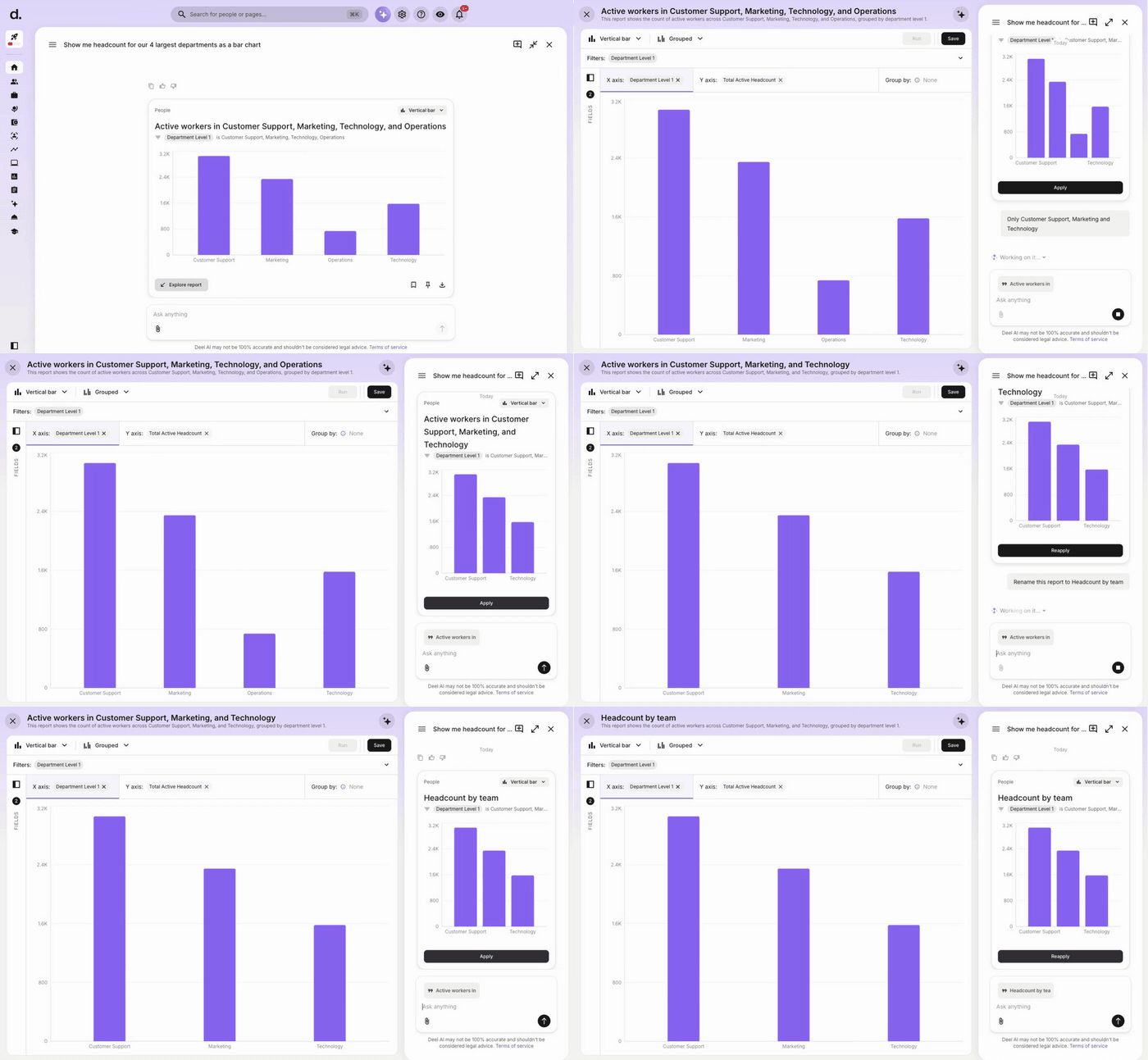
From the chat card to the editor: Explore report opens the report with the conversation beside it, a request for three departments becomes a proposal that Apply puts in place, and a rename goes through the same path
When we first started building the MVP and storyboarding the experience, we zoomed in on two questions about what the agent can do and see on the screen.
Who owns what?
In every Copilot interaction, there are three parties: you, the Copilot, and the report editor. We decided that each party should own one thing.
| Party | Owns | What this means |
|---|---|---|
| You | The Apply button | The Copilot cannot write to the report. A change happens only when you click Apply. |
| Copilot | The proposal | The Copilot sends a complete report. If a request changes nothing, the Copilot sends no proposal. |
| Editor | The report | The editor keeps the report state. Applying a proposal is an ordinary state change, the same path undo and redo use. |
The same split decides what the Copilot does with each message. A request to change, add, or remove something becomes a proposal. Questions like "why is Sales so much bigger?" get a text answer and no Apply button.
Every proposal stays in the thread. You can apply any of them later, so the conversation works as a history of the report. After the first click, the button says Reapply, because early testers kept clicking Apply without being sure anything had happened.
What do the agent and the editor agree on?
We use three rules.
No diffs. The Copilot rebuilds the full report for each change. It restates the whole query with your change applied, runs it like any other report, and sends the result as a proposal with a stable ID the editor can track. This gives three benefits:
If a field changes between turns, the proposal is still correct, because the Copilot rebuilt it against the current data model.
Apply replaces the editor state, so undo and redo work with no special code. It's also instant, because it doesn't call a server.
Because the agent already ran this exact query to build the proposal, the result is typically still in cache, so the updated report loads almost immediately.
No sync protocol. The editor sends its full current state with each message. The Copilot never assumes that you applied an earlier proposal. You can ignore a proposal, edit the report by hand, or undo a change. Each turn starts from the report on the screen. If you edit while the agent is still thinking, its proposal reflects a slightly older report. Nothing applies until you click, and the next turn corrects itself. The editor waits half a second after the last change before it refreshes the snapshot that goes with your next message, because the state can change on every keystroke.
The Copilot is the same agent as the chat. It uses the same endpoint, the same data model, and your own credentials. All permission rules apply. There's no Copilot API. Every chat message goes through our chat gateway, the service that receives messages and routes them to the right agent. When a message comes from the editor, the gateway sends it straight to the analytics agent instead of running the usual classifier first. On the agent side, the prompt gains a description of the current report and a set of edit rules only when the message carries editor context. We sanitize that state before it goes in, so nothing inside a report can be read as instructions to the agent.
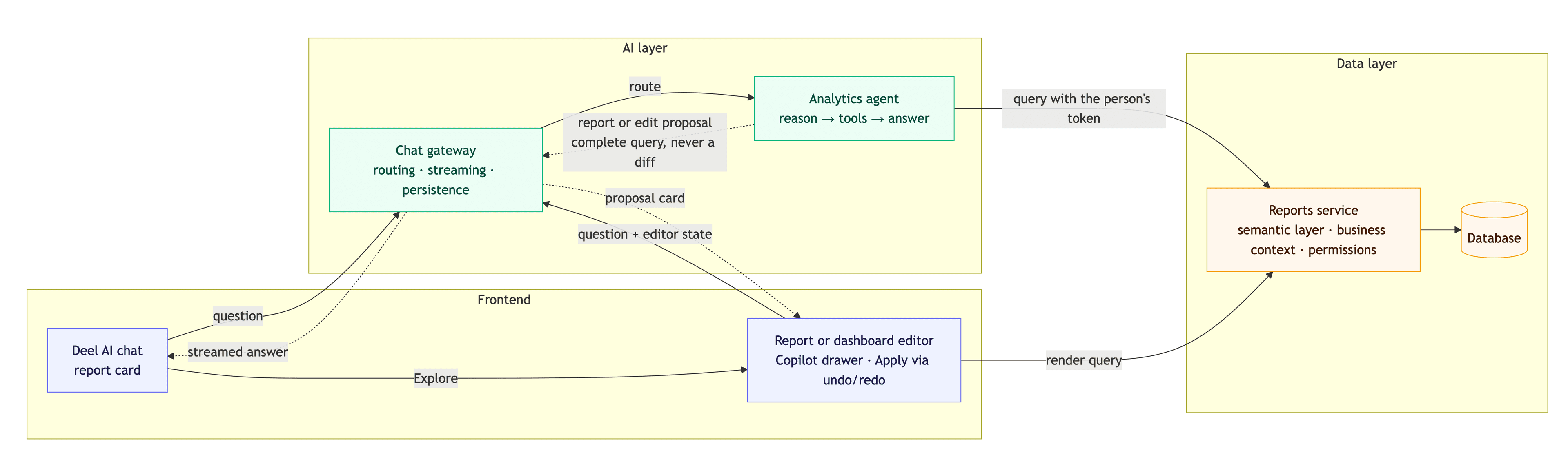
Figure 1 · The same agent behind the chat and the editors. Chat and the editors talk to the same agent. An editor adds its current state to every message and applies proposals through its own undo channel.
Dashboards
The same rules apply to dashboards. A dashboard is a grid of tiles, and each tile is a report. With each message, the dashboard editor sends all tiles and the grid layout. You can select tiles to tell the Copilot which ones to change, or call them by name. The Copilot can change or add up to ten tiles in one turn. Only you can delete a tile.
You can also start a dashboard in the chat. Ask for one, and the agent asks what it's for, offers a set of reports it can back with data, and builds the ones you pick. Click Explore dashboard to open it in the editor, where the Copilot is one click away.
The request we like most is "What would be interesting to add to this dashboard?" The Copilot reads what the dashboard already covers and looks for what's missing. Before it suggests a report, it checks the data, so it doesn't suggest reports built on data your organization doesn't have.
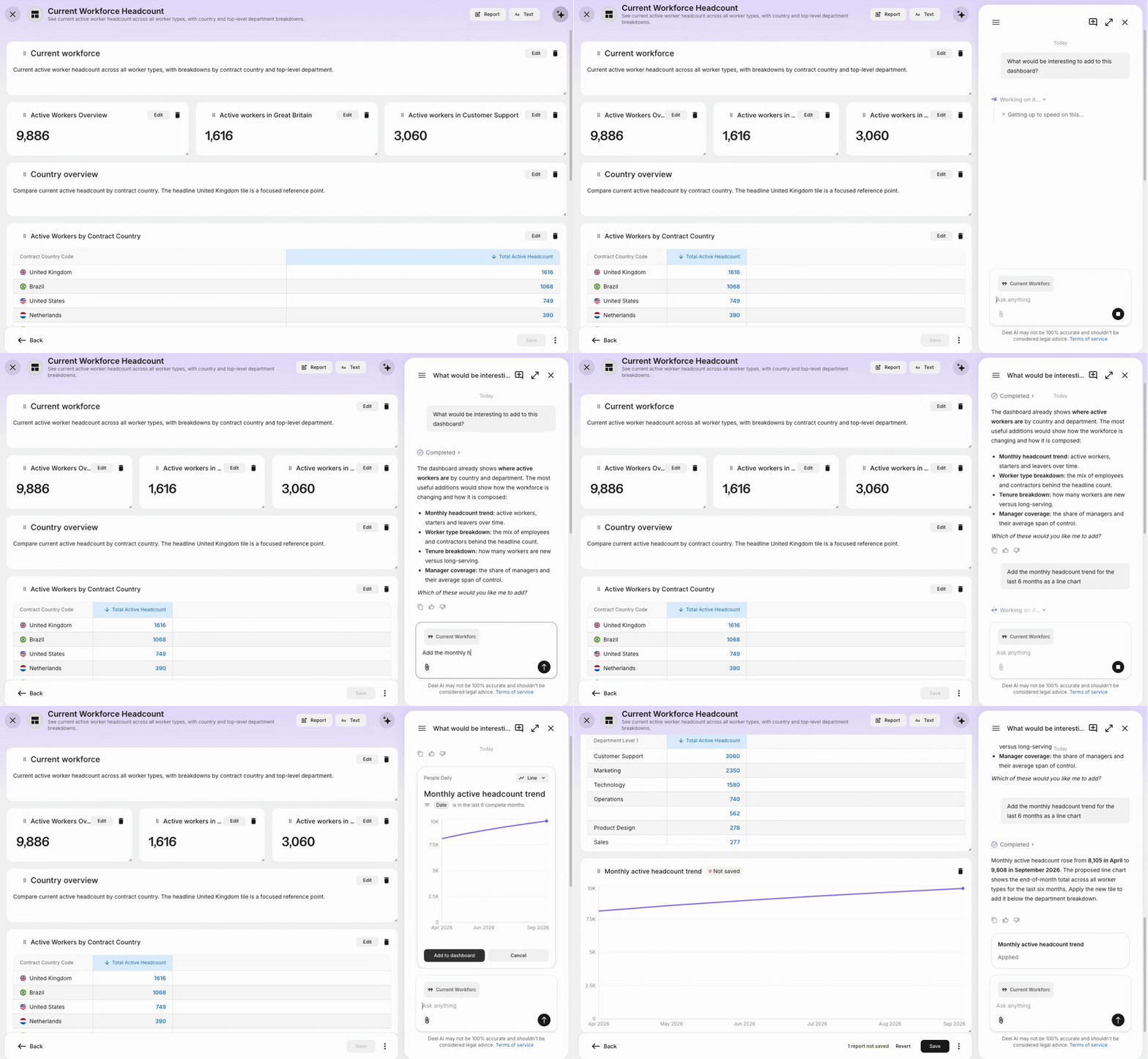
Asking the Copilot what to add to a dashboard, then asking for one of its suggestions. Add to dashboard places the new tile on the grid
Layout changes work the same way. If you ask the Copilot to rearrange tiles, it proposes a new layout for the whole grid, and we reject it unless every tile has a place. The Copilot also stamps a snapshot of the grid on every reply, so "put it back the way it was" still works a few turns later.
How we keep it working
The Copilot has no write path to your report. Everything it produces is a proposal until you click Apply, and about three in four proposals get applied. This is how we keep the development quality:
Changes that stay off until used. We merged the agent, gateway, and frontend changes separately. Each change did nothing until the editor sent context, so each part could be released and rolled back on its own schedule.
Evals as a gate. Each prompt or model change runs the full eval suite against the current version. An LLM judge grades each turn on eight criteria, from relevance to numerical grounding. This way we are able to catch features that would hurt the current experience.
A reviewer agent. Each day, an agent reviews production conversations that ended escalated to humans. A person confirms each finding, which becomes a ticket. Another agent picks up the tickets and opens draft pull requests, which we replay against the evals before anyone merges them. That loop deserves its own post, and we'll publish it soon.
What's next
Until recently, the Copilot could only build from the measures and dimensions a data model already defines. We're teaching it to create its own fields. Calculated fields built from the ones available, such as net pay per head from total net pay and headcount, are rolling out now. Custom measures and dimensions come next.
If we were starting again, we'd ask the same two questions first. Who owns what, and how little the agent and the editor need to agree on. Everything else followed from those two answers, down to the Reapply button.
João Caetano is an AI Engineer at Deel, where he leads day-to-day work on the analytics agent in Deel AI. He works on turning plain-language questions into reports people can trust, from prompt design and evals to production monitoring. Before Deel, he built machine learning systems for fraud detection and anti-money laundering.