
Article
3 min read
How Akai Automates 100,000 Cases a Month

Author
Bruno Giannotti
Last Update
September 30, 2026
Table of Contents
The problem we set out to solve
What is Akai?
Two ways to let an agent act
What that looks like on a normal morning
What the agent sees
What a tool looks like
What the declaration buys us
When the agent needs a machine
The rule
The problem we set out to solve
Deel runs payroll, HR, and compliance for teams in 150+ countries. Behind that sits a large amount of operational work: reconciling payments, checking payslips, triaging support cases, chasing documents. Each job is a chain of small steps across several internal and third-party systems. Each step is simple. The chain is long, it repeats every day, and a mistake at step three shows up as a wrong number for a real person.
We wanted AI agents to take on that work. Not to draft or summarize it, but to do it: read the queue, make the call, update the record, and hand it off to a person when a decision needs one. And we needed the thousandth run to be as reliable as the first.
That forced one question before anything else. How should an agent touch a real system?
What is Akai?
Akai is the internal platform we built at Deel to answer that question. People at Deel describe a workflow in plain language, connect the systems it needs, and put it on a schedule. Each run happens in its own isolated environment with a hard time limit. Every action the agent takes goes through the workflow we wrote, and every change it wants to make goes through a gate. Runs are recorded and scored, and a nightly review proposes edits to the workflow's instructions when it spots a repeated mistake.
Two ways to let an agent act
There's a fork every team hits when an agent moves from answering questions to doing work.
Give it a computer. A sandbox with bash, curl, and Python. It's flexible from day one, and the demos are impressive. But on every run the model rediscovers the endpoint, the auth header, the pagination, and the error shape. It works one way on the first run and a slightly different way on the thousandth. Nobody reviews the difference.
Give it a toolbelt. A person writes each operation once, as a typed command. The model chooses the command and fills in the parameters. Same call, same shape, every time.
In a workflow with 40 steps, a small variation at step three compounds by step 40. For work that touches someone's pay, "right most of the time" isn't right.
So we chose the toolbelt for every repetitive job. We kept a secure bash for open-ended work. And we never let bash itself act as the permission model.
What that looks like on a normal morning
At 06:00 a scheduled agent starts in its own isolated environment. It reads a payment queue through a command-line tool, finds three items, and resolves two. The third needs a change it isn't allowed to make alone. The owner gets a Slack message, approves from their phone, and the run completes. That night, the review pass reads the run, spots a repeated mistake in a payslip check, and proposes an edit to the agent's instructions. Nobody was watching.
Every step in that run touched a real system. None of them touched a shell. That isn't an accident. It's the design.
What the agent sees
The difference is easiest to see from the agent's side. To pull the last hour of error logs for a service, an agent with a machine has to produce something like this, from memory, on every run:

Where does the token come from? Which datasource UID? What happens on a 401? How does it page past 100 lines? Every one of those questions gets answered inside the model, at token cost, with no reviewer.
An agent with the toolbelt runs this, through dt, our command-line program:

The endpoint, the auth, and the response shape live in the tool. The model supplies intent.
What a tool looks like
We call each of those commands a dt tool. A dt tool is one observable operation, declared once by a person. Here's a real one, trimmed. It's the command above:
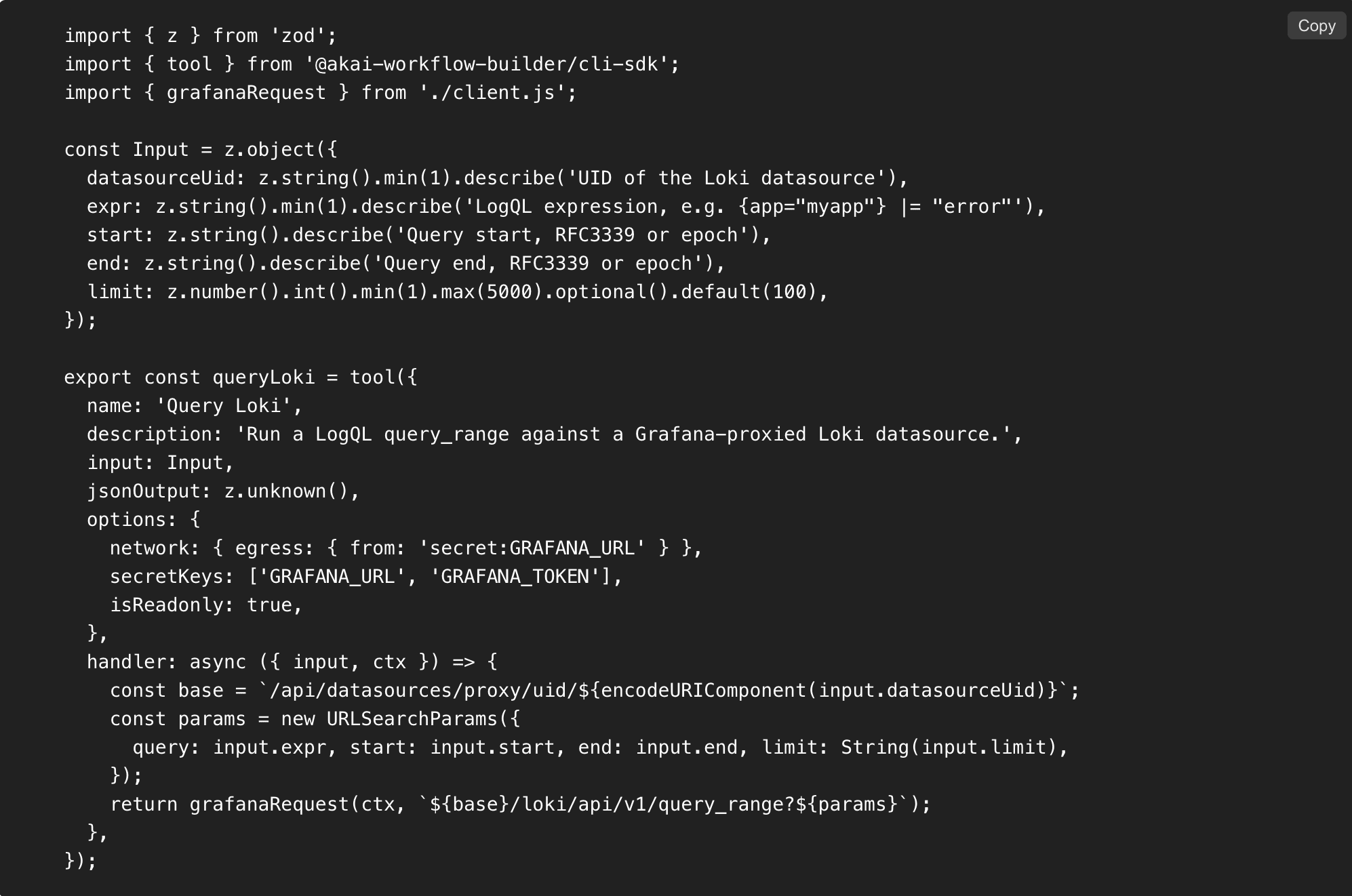
Five things are declared, and the SDK refuses a tool that leaves one out:
What it accepts. A typed input schema. Bad arguments fail before any network call.
What it returns. An optional output schema, so the result has a shape the next step can trust.
Whether it writes. A mandatory read-only flag. This one line is what makes the approval gate possible.
Where it may talk to. A network egress allowlist. This tool can reach the declared host and nothing else.
Which secrets it needs. Named keys, injected at call time. The handler reads them. The model never does.
A handful of these, grouped under one CLI definition, become a command family the agent can discover and run.
What the declaration buys us
Safety
Permission attaches to the operation, not to the shell. Because read or write is declared, the gate can be exact. Reads run free. A write runs in two passes: the first stops at the gate and raises the approval, and the second runs only once a person or a policy has approved it. The owner in the morning run above approved from Slack. The agent never held the ability to skip that step. In bash, you find out it was a write after it has happened.
Credentials never reach the model or a general shell. Secrets arrive as environment variables in a per-call subprocess that exits when the call does. A denylist blocks any key that would load code into that child, such as the Node options and preload variables, and the CLI's own control-plane keys. An allowlist limits what the child may hand back. The model sees the output, never the token.
Operability
Every outcome is classifiable. A refusal comes back with a fixed prefix and a known phrase, so the platform scores each call as succeeded, blocked with a reason, or errored. That one property feeds per-call failure attribution, the nightly review that proposes instruction edits, and the usage report leaders read. Free-form shell output can't be scored this way, so a machine-based agent is a black box at exactly the moment you need to know what went wrong.
Bounded by construction. Each call has a timeout. Output is capped, and past the cap the child is killed and the agent is told to narrow the query. Parallel fan-out has a fixed ceiling. A runaway command can't take the run's environment down with it. A machine gives the agent an unbounded loop and hopes for the best.
Economics
Discovery is cheap. The CLI describes itself, and its help text is injected once per session as a single context block. Several hundred tools are reachable without listing them in the prompt. An unknown command degrades to a list of subcommands, never a crash, so a wrong guess costs one short turn.
Re-derivation has a measured price. Even with deterministic tools, an agent re-derives the schema and enums of its domain on every run. When we cached that orientation per workflow, accuracy stayed the same and cost on orientation questions fell by about half. Without deterministic tools the agent would re-derive the command as well. The tool removes one layer of rediscovery. The cache removes the other. Both are paid for once instead of every run.
Building one takes an afternoon. A tool is a small package: one define call, one tool per file, one handler. It ships through the catalog service, and the worker picks it up without a rebuild. Today the catalog holds 49 packaged tools and the worker 65 command domains.
When the agent needs a machine
Some work is open-ended: reshaping a spreadsheet, transforming a file, a one-off script. For that, an agent can get a bash tool on an isolated, short-lived machine, spun up for the session and torn down after it. That machine carries no session credentials. The keys live only in the toolbelt's per-call subprocess, and the shell never sees them.
So the agent still gets a computer when it needs one. It just doesn't get the keys with it.
The rule
Tools are the unit of permission and approval. Composition belongs to the planner. The machine gets no keys.
That's why the toolbelt is a permission model, not a convenience.
Senior Software Engineer building Akai, passionate about engineering and businesses. Enjoys deep diving on low level technologies for game engines, AI and graphics programming.