Article
8 min read
How to Ensure Accurate Take-Home Pay After Deductions with One Calculator
US payroll

Author
Shannon Ongaro
Last Update
April 08, 2026

Table of Contents
Understanding pre-tax vs. post-tax deductions
The correct order for gross-to-net calculations
Sample gross-to-net breakdown
What makes a take-home pay calculator accurate
How Deel's take-home pay calculator works
Validating results: Estimation vs. actual payroll
Get your numbers right from the start
Key takeaways
- Accurate take-home pay calculations depend on applying deductions in the correct sequence: pre-tax first, then federal and state taxes, then post-tax.
- A reliable gross-to-net calculator must account for FICA, federal withholding, state and local taxes, and other types of employee deductions to produce trustworthy estimates.
- Deel's free take-home pay calculator gives HR and finance teams an instant, location-specific net pay estimate for US teams and beyond.
Your team has just extended an offer. The candidate accepts the gross salary, then asks the question almost every new hire asks: "What will I actually take home?"
It's a fair question — and a surprisingly complicated one to answer accurately. Federal taxes, state income taxes, FICA contributions, pre-tax benefit deductions, and post-tax withholdings can turn an $80,000 salary into a very different number depending on where an employee lives and how their benefits are structured.
This guide walks HR and finance teams through exactly how accurate US employee take-home pay calculations work: what data you need, why deduction order matters, what to look for in a gross-to-net calculator, and how to validate your results.
What you need before you calculate
Accurate take-home pay starts before you touch a calculator. The quality of your output depends entirely on the accuracy of your inputs.
Here's the employee-specific payroll input data you need to gather:
| Input | Details |
|---|---|
| Gross pay | Annual salary or hourly wage |
| Pay frequency | Weekly, biweekly, semi-monthly, or monthly |
| Form W-4 details | Filing status (single, married, head of household) and withholding elections |
| State and local jurisdiction | Employee's work and/or home state; cities with local taxes (e.g., New York City) |
| Pre-tax deductions | Health insurance premiums, 401(k) contributions, HSA or FSA elections |
| Post-tax deductions | Roth IRA contributions, wage garnishments, union dues |
| Additional earnings | Overtime, bonuses, tips, commissions |
Missing or estimated inputs at any of these stages introduce compounding errors downstream. A calculator is only as accurate as the data behind it.
Global Hiring Toolkit

Understanding pre-tax vs. post-tax deductions
Before you can calculate net pay, you need to understand how different deductions interact with taxable income, as the order in which they're applied changes the final number significantly.
Pre-tax deductions are subtracted from gross pay before taxes are calculated. They reduce an employee's taxable income, which lowers the amount subject to federal, state, and FICA taxes. The IRS defines qualifying pre-tax benefit elections under Section 125 of the Internal Revenue Code (cafeteria plans). Common examples include:
- Health, dental, and vision insurance premiums (employer-sponsored plans)
- Traditional 401(k) contributions
- Health Savings Account (HSA) and Flexible Spending Account (FSA) elections
- Commuter benefits
Post-tax deductions come out after taxes have already been calculated and withheld. They don't reduce taxable income. Common examples include:
- Roth IRA contributions (taxed now, tax-free in retirement)
- Court-ordered wage garnishments
- Union dues
- Voluntary life insurance beyond employer-provided coverage
Always verify an employee's specific elections before inputting deduction amounts.
The correct order for gross-to-net calculations
Getting the sequence right is non-negotiable. Here's the calculation order that determines accurate gross-to-net pay:
Step 1: Subtract pre-tax deductions from gross pay
This gives you the employee's taxable wages, which is the figure all subsequent tax calculations use as their base.
Example: $80,000 USD gross annual salary − $5,000 in annual 401(k) contributions − $2,400 in health insurance premiums = $72,600 taxable wages
Step 2: Calculate FICA taxes
FICA (Federal Insurance Contributions Act) covers Social Security and Medicare. Employees pay 6.2% of eligible wages for Social Security (up to the annual wage base) and 1.45% for Medicare, for a combined employee rate of 7.65%.
Step 3: Calculate federal income tax withholding
Federal withholding is calculated based on the employee's W-4 filing status and elections, using the IRS wage bracket or percentage method tables from IRS Publication 15-T. The amount varies significantly depending on the employee's declared allowances and filing status. Employees can also use the IRS Tax Withholding Estimator to review their elections before submitting a W-4.
Step 4: Calculate state and local income taxes
Every state handles income tax differently. Nine states — including Texas and Florida — have no state income tax at all. Others, like California, have progressive rate structures that can materially affect take-home pay. Some cities impose local income taxes on top of state rates.
Step 5: Subtract post-tax deductions
After all taxes are withheld, subtract any post-tax deductions — Roth contributions, garnishments, or other after-tax elections — to arrive at net pay.
Deel Payroll - US

Sample gross-to-net breakdown
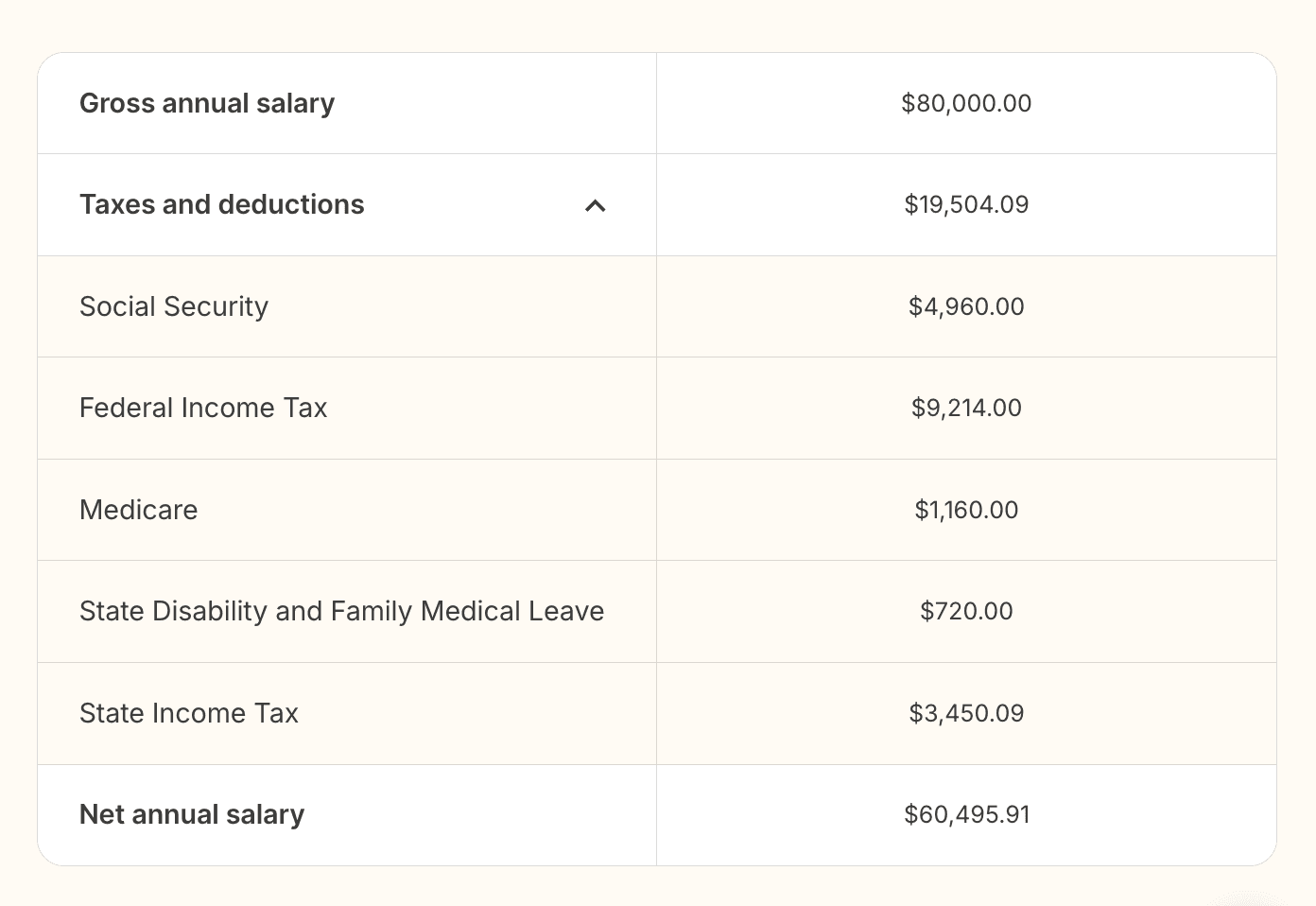
Here's what this looks like in practice using Deel's take-home pay calculator for a California-based employee on an $80,000 annual salary:
| Component | Annual | Monthly | Semi-monthly |
|---|---|---|---|
| Gross salary | $80,000.00 | $6,666.67 | $3,333.33 |
| Social Security | $4,960.00 | $413.33 | $206.67 |
| Medicare | $1,160.00 | $96.67 | $48.33 |
| Federal Income Tax | $9,214.00 | $767.83 | $383.92 |
| State Disability & Family Medical Leave | $720.00 | $60.00 | $30.00 |
| State Income Tax | $3,450.09 | $287.51 | $143.75 |
| Net salary | $60,495.91 | $5,041.33 | $2,520.66 |
That's $19,504.09 in taxes and withholdings on an $80,000 salary, which is roughly 24.4% of gross pay. Change the state, adjust the filing status, or add pre-tax benefit elections, and that number shifts considerably.
What makes a take-home pay calculator accurate
Not all calculators are built the same. For HR and finance teams making real employment decisions, accuracy isn't optional.
An accurate gross-to-net calculator needs to support:
- Current tax rules: Tax rates, thresholds, and brackets change annually. A calculator that doesn't update automatically will produce stale results from the moment a new tax year begins
- All applicable US states: State income tax rates, SDI contributions, and paid family and medical leave (PFML) rates vary significantly
- Multiple pay frequencies: Annual, monthly, and semi-monthly calculations, because pay frequency affects per-period withholding amounts
- Transparent assumptions: Any tool worth using will clearly state what it assumes (single filer, full year of earnings, no dependents) so you know exactly what you're working with
Calculators built on live, structured tax rule databases, rather than manually updated spreadsheets, are inherently more reliable because rate changes propagate immediately.
How Deel's take-home pay calculator works
Deel's take-home pay calculator is a free, publicly available net pay estimation tool. When Deel's payroll team updates a tax rule in Deel, that change is immediately reflected in the calculator. There's no manual refresh cycle, no lag between a regulatory change and the tool's output.
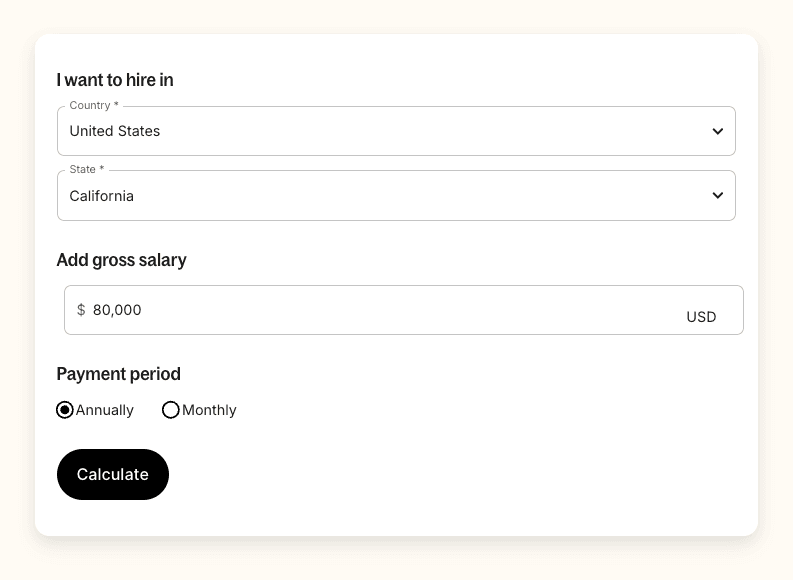
How to use it
- Select the country and state: Choose "United States" and the employee's state of employment. The calculator automatically applies that state's income tax rates, SDI rules, and any applicable statutory deductions.
- Enter the gross salary: Input the employee's gross salary in USD.
- Select the payment period: Toggle between annually, monthly, or semi-monthly to set your input basis.
- Calculate: Deel instantly returns a full salary details breakdown, including:
- Gross salary (viewable across annual, monthly, and semi-monthly periods)
- Social Security and Medicare contributions
- Federal Income Tax withholding
- State-specific taxes (e.g., State Income Tax plus State Disability and Family Medical Leave for California)
- Net take-home salary across all three pay period views
What the calculator assumes
Because it's an estimation tool, Deel's take-home pay calculator operates on a set of standard assumptions. It's built for a single tax filer with a full year of earnings and no dependents. It does not account for:
- Municipal or city-level taxes beyond what's built into state rules
- Religious affiliation-based taxes (relevant in some countries)
- Household or personal status variations
- Pre-tax benefit elections (e.g., 401(k), health insurance premiums)
As such, the calculator is designed for offer-stage planning and compensation modeling, not for replacing a compliant payroll run.
Validating results: Estimation vs. actual payroll
Even the most accurate take-home pay calculator is a planning tool, not a payroll system. A few things to keep in mind when using the output:
Compare against real pay stubs
If you already have employees on payroll, compare the calculator's output for a known salary against actual net pay figures on pay stubs. This confirms the tool is aligned with your payroll setup.
Test edge cases
Run scenarios that reflect your actual workforce: workers in high-tax states, employees with significant pre-tax elections, or workers earning supplemental income. If the output looks off, the most likely explanation is that the calculator's standard assumptions don't match the employee's actual benefit or filing situation.
Remember that benefit elections move the number significantly
An employee contributing $10,000 annually to a 401(k) and $3,000 to an HSA will take home more than the calculator's base estimate suggests, because those pre-tax elections reduce taxable income before any taxes are calculated.
Use it for planning, not processing
Deel Payroll for US teams handles the full run, with W-4 data, verified benefit elections, and time and attendance integration. The take-home pay calculator is a companion planning tool to help you make better hiring decisions faster. Use it to model and compare, then let Deel Payroll do the rest. If you want a broader walkthrough of the full process, see our guide on how to do payroll.
Get your numbers right from the start
Gross salary is only half the conversation. When candidates ask what they'll actually take home, you need a fast, accurate answer — one that accounts for their state's tax structure, not a generic national average.
Deel's free take-home pay calculator gives you that estimate instantly, for any US state. Use it to model compensation scenarios and compare net pay across locations, or explore how Deel Payroll - US can simplify the process further.
FAQs
What is take-home pay, and how is it calculated?
Take-home pay — also called net pay — is the amount an employee actually receives after all taxes and payroll deductions are subtracted from gross earnings. It's calculated by first subtracting pre-tax deductions from gross pay to determine taxable wages, then withholding FICA taxes, federal income tax, and applicable state and local taxes, and finally subtracting any post-tax deductions.
How accurate are take-home pay calculators?
Modern take-home pay calculators that use current tax tables and correct employee inputs typically produce estimates that are close to actual net pay.
With Deel's calculator, rates stay current as regulatory changes are applied.
The main sources of variance are employer-specific benefit elections and personal tax circumstances not captured by standard assumptions (single filer, no dependents, full year of earnings).
What information do I need to calculate take-home pay?
You need the employee's gross pay, pay frequency, Form W-4 details (filing status and withholding elections), state and local tax jurisdiction, and data on any pre-tax or post-tax deductions — such as health insurance premiums, 401(k) contributions, or wage garnishments. For a quick planning estimate, gross salary and state are enough to get a useful directional number.
Why does take-home pay differ by state?
State income tax rates, state disability insurance (SDI) contributions, paid family and medical leave (PFML) rates, and local tax rules vary significantly across the US. An employee earning $80,000 in California faces withholdings that don't apply in states like Texas or Florida, resulting in a noticeably different net pay figure despite identical gross salaries.
What's the difference between gross pay and net pay?
Gross income is the total compensation before any taxes or deductions. Net pay is what remains after all taxes, pre-tax benefit elections, and post-tax deductions are withheld.
Disclaimer: The information in this article is provided for general educational purposes only and does not constitute legal, tax, or financial advice. Tax rules and rates change regularly. Always consult a qualified tax or payroll professional for guidance specific to your organization and employees.
Shannon Ongaro is a content marketing manager and trained journalist with over a decade of experience producing content that supports franchisees, small businesses, and global enterprises. Over the years, she’s covered topics such as payroll, HR tech, workplace culture, and more. At Deel, Shannon specializes in thought leadership and global payroll content.