Remote Work Glossary
- Results for "undefined"
Table of Contents
What does HR software do?
What are the main types of HR software?
Who uses HR software?
What are the benefits of HR software?
Do I need HR software? What signs should I look for?
Do different company sizes need different HR software?
How does HR software support global teams?
What are the most important features of HR software?
How do you choose HR software?
How long does HR software implementation take?
What are common HR workflows that software can automate?
What are the common challenges in implementing HR software?
How much does HR software cost?
Deel: Your all-in-one global HR software
What is HR software?
Human resource software is a digital tool that helps HR professionals manage and streamline daily HR functions, including onboarding, payroll, benefits, time tracking, leave management, and more. HR software enables HR staff to maximize their time and effectively achieve the company’s HR objectives.
HR systems typically fall into two types of software options.
- On-premises HR software: Installed on an individual computer and operates within the company’s intranet.
- Cloud-based HR software: Accessible by any device or mobile app with internet access after successful login identification.
What does HR software do?
HR software centralizes employee information and automates human resources tasks, such as recruitment, onboarding, payroll processing, benefits management, training, and performance tracking.
It’s possible to purchase software focused on a specific task, such as applicant tracking, or a more comprehensive package that supports various core HR functions in a single platform.
What are the main types of HR software?
The key types of HR software are divided into three categories: core HR software (HRIS, HRMS, HCM), specialized software (ATS, LMS, payroll, survey tools, etc), and all-in-one solutions (combining multiple software capabilities).
Core HR systems (Data backbone)
These systems manage essential employee data and administrative HR functions. They vary in scope:
- Human Resources Information Systems (HRIS): HRIS software focuses on storing and managing employee records, job data, and compliance-related information. This type of software is designed to integrate with other tools. Some providers also include payroll and benefits tracking. Primary use: Data management, compliance, record-keeping.
- Human Resources Management Systems (HRMS): HRMS includes all HRIS functions but adds process automation for HR activities like payroll, time tracking, leave management, onboarding, and talent management. Primary use: Data + automation of HR processes.
- Human Capital Management (HCM): HCM tools are the broadest of the three. They combine HRIS and HRMS functions with strategic tools, including workforce planning, performance management, succession planning, and analytics. Primary use: Full employee lifecycle management and strategy.
You can think about these as tiers: HRIS (basic data), HRMS (data + process automation), HCM (automation + strategy).
Specialized HR software (Function-specific tools)
These solutions focus on a single HR area and are either standalone or integrations into core systems:
- Payroll and benefits systems: Specialized payroll and benefits systems help companies handle global and local payroll processing, statutory compliance, tax filings, and employee benefits administration.
- ATS (applicant tracking system): Supports recruitment processes, including job postings, candidate tracking, interview scheduling, and offer letters.
- Performance management platforms: Enable goal setting, performance reviews, feedback, and career development tracking.
- Learning management systems (LMS): Facilitate employee training, compliance courses, certifications, and learning paths. Multimedia content, gamification options, and an intuitive system elevate learners’ experience.
- Engagement and survey tools: Gather feedback on engagement, onboarding, DEI, manager performance, etc., to inform HR decisions.
- Compensation tools: Used for salary benchmarking, pay equity analysis, and planning compensation cycles.
All-in-one HR platforms
These solutions consolidate multiple core and specialized tools into a single system, which is particularly helpful for fast-scaling or global organizations.
Examples: Deel, BambooHR, HiBob, SAP SuccessFactors
Capabilities typically include:
- Employee records
- Time off, payroll, and benefits
- Recruitment and onboarding
- Performance and learning
- Workforce analytics
- Workflow automation

What is HR management software?
HR management software, or HRMS, is a blanket term that includes all applications that help in automating typical human resources tasks. These tasks included data management, onboarding, offboarding, job applicant tracking, payroll processing, benefits administration, time-off requests, performance management, compliance management, succession planning, and HR analytics/reporting.
Read more: HRIS vs. HRMS: Find the right fit for your organization.
Who uses HR software?
HR teams, managers, and employees use HR software. HR teams use the software to perform their day-to-day activities and do long-term planning. Managers use the HR systems to access their reportees’ information and perform their managerial duties, like approving leaves, providing feedback, and more. Employees use HR software to view their documents/information, raise any requests, upskill/get feedback for professional growth, and complete any surveys.
What are the benefits of HR software?
Key HR software benefits are streamlined processes and saving time spent on HR activities. Let’s have a detailed look at all the benefits below:
- Streamline routine HR tasks: Automates repetitive, low-impact administrative tasks. It also reduces human error during manual processes.
- Saves time and effort: Gives HR professionals more time for productive, strategic tasks and decision-making.
- Simplifies data management: Improves the organization of documents, employee data, and more. It also encrypts sensitive employee data for privacy and security.
- Elevates employee experience: Improves employee experience with self-serve options.
- Supports employee development: Provides tools for learning and getting feedback from managers/peers for professional development.
- Ensures compliance: Maintains accurate record-keeping and reporting. It helps in compliance, especially when working with international workers.
- Supports analytics: Provides accurate insights to make decisions or improve processes from robust analytics.
“Before Deel, we were doing fifty transfers and three deductions per person—every single cycle, all manually, with different banks, different countries, and different laws. It was a lot of work. My VP saw how many hours we spent on manual payroll and said, ‘If a tool frees you to focus on what matters, it’ll save us more than it costs.’ Deel proved him right.”—Lucía Rodriguez, Head of HR, Ladonware.
Do I need HR software? What signs should I look for?
Look out for these five key signs that you need HR software:
- You are scrambling through Excel sheets to find any data.
- Your team is spending way too much time on routine HR tasks, such as payroll or onboarding.
- You are getting poor feedback from workers or potential workers about their experience.
- Your team does not have a standardized process for key hiring or worker management tasks.
- You are struggling with compliance audits due to a lack of data.
Read more: Identified the bottlenecks in your HR processes? Now, learn how to make a business case for HR software for your leadership.
Do different company sizes need different HR software?
Yes, different businesses have different needs and goals with HR software. Small companies need HR software to automate their HR tasks. Medium-sized companies need strategic tools to grow their businesses and improve their workers’ performance. On the other hand, large companies need HR tools that can handle scale while providing a consistent experience for their workers.
Do small businesses need HR software?
Yes, small businesses need HR software to automate administrative tasks. They often operate with a one-person or very small HR team to handle all HR processes. Having HR software helps them centralize employee data, streamlines processes, and maintains compliance.
Which HR software is best for enterprises?
A comprehensive HCM, or all-in-one HR solution, is better suited for an enterprise because it provides both administrative and strategic functionality. You can automate the HR tasks and also get reports for workforce planning, salary benchmarking, etc. Some examples include Deel, Workday HCM, Paycor, and BambooHR.
How does HR software support global teams?
HR software enables global teams to efficiently manage human resource operations and ensure compliance across multiple countries. The key benefits of HR software for global teams are:
- Centralized data management: Brings workers’ data across multiple locations into one platform.
- Remote onboarding: Onboards new hires remotely, irrespective of their location.
- Global payroll: Runs payroll processes smoothly in multiple currencies
- Multi-lingual support: Provides a self-serve platform to workers supporting multiple languages.
- Multi-country compliance: Adapts processes and data storage rules to local labor laws.
“Ten years ago, while managing my previous company, I realized I had to internationalize my team. Hiring people outside Europe was a real pain—a nightmare because of regulations. I wanted to scale the business quickly, but the global hiring process wasn’t scalable at all. Deel gives me the ability to think big and the assurance that my workforce can scale globally from day one.”—Rachel Delacour, CEO and Co-Founder of Sweep.
What are the most important features of HR software?
The most important features of HR software are worker data management, recruitment management, new hire onboarding, payroll and benefits administration, learning management system, performance management, reporting, and analytics. Each of these features helps in running end-to-end HR workflows. Let’s see how:
- Worker data management: Building a single and secure repository to save all workers’ data, including their documents, contact information, job details, and compensation.
- Recruitment management: Running standardized workflows to handle candidate communication, interview scheduling, time-zone management, and more.
- New hire onboarding: Automating the new hire documentation and enabling remote training for distributed teams
- Payroll and benefits administration: Managing all payroll, tax deduction, and benefits contributions as per the local laws.
- Learning management: Creating training content and development plans to support workers’ growth. Allowing HR and managers to assign any training, while also enabling workers to self-enroll in training based on their interests.
- Performance management: Enabling systems for employees to set goals, track career paths, and gather continuous feedback for long-term success.
- Reporting and analytics: Providing in-built dashboards and reports for HR and leadership to make strategic decisions.
How is AI used in HR software?
AI is used in HR software to automate repetitive tasks, draw data-driven insights, and personalize the worker/candidate experience. Some top use cases of AI in HR software include automated resume screening, personalized communication between workers and candidates, training outline/content creation, and predictive analytics for workforce planning.
Read more:
How do you choose HR software?
The key steps in choosing HR software are identifying your company’s technical and strategic needs, then evaluating software based on them.
Use this simple checklist to choose HR software:
- Does the software automate the required HR tasks?
- Can it be easily integrated into your current tech stack?
- Is the software intuitive with a minimal learning curve?
- Can it operate compliantly across all your working locations, with currency and language support?
- Is the pricing in your budget?
- Does it offer adequate customer support?
- Is it compliant with local labor laws and data protection standards?
- Does it offer advanced AI features?
- Can it easily scale with time as your company expands further?
How long does HR software implementation take?
There is no standard timeline for implementing HR software. For some companies, it could be done in a few weeks, while for others, it would take months. It all depends on the complexity of your process and how well you plan the implementation process.
More resources: Discover a detailed plan for HR software implementation and a quick implementation checklist to speed up the implementation process
What are common HR workflows that software can automate?
The common HR workflows that a software can easily automate are:
- Onboarding and offboarding
- Time and attendance management
- Employee data management
- Talent sourcing and recruitment
- Background checks
- Payroll processing
- Employee training and performance management
- Compliance and other documentation management
- Reporting
Read more: Learn how to automate each of these HR processes with Deel today.
What are the common challenges in implementing HR software?
Some common challenges in implementing HR software are poor planning, low user adoption, data migration or integration issues, and budget overruns. You can overcome each of these challenges by:
- Poor planning: Build an implementation checklist before even starting the migration for better planning.
- Low user adoption: Choose a software with an intuitive interface and a low learning curve to increase user adoption.
- More data migration or integration issues: Verify whether the software integrates with your existing tech stack in advance.
- High budget overruns: Check the software pricing not just for your current headcount but also for forecasted headcount in the future.
How much does HR software cost?
HR software costs vary widely from $5 to $500 per worker per month, depending on the vendor and the features you need. For example, the Deel HRIS subscription starts at just $5 per employee per month, helping you onboard and manage your workforce from anywhere.
Deel: Your all-in-one global HR software
With the growing complexities of a distributed, global workforce, HR teams often end up having to manage a patchwork of disconnected tools. They don’t have a single source of truth for their core workforce data, no unified dashboard, no seamless data flow. This setup wastes time and prevents strategic HR operations.
Deel is that all-in-one solution that brings all people functions, from hiring and onboarding to developing and offboarding, in one place. Using Deel, you can:
- Hire anyone, anywhere, compliantly across 150+ countries
- Onboard workers remotely across locations
- Buy or lease IT equipment and ship it to workers
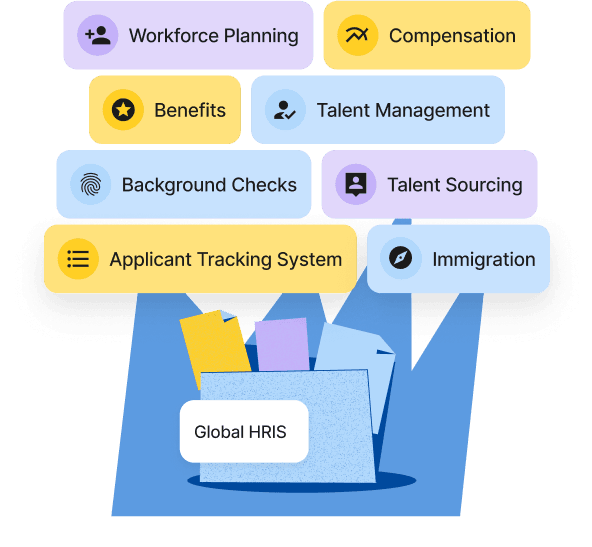
- Manage all worker types, direct employees, EORs, and contractors in one global HRIS
- Run global payroll seamlessly across locations
- Provide feedback and growth opportunities to workers
- Engage your workforce with surveys
- Plan smarter with unified workforce and compensation data
- Get built-in analytics to make salary and workforce decisions
40,000+ companies already trust Deel to simplify their global HR. Book a quick demo of Deel to bring all your HR processes in one place.