Article
7 min read
What's coming to Deel in September
Deel news

Author
Deel Team
Last Update
September 02, 2026
Table of Contents
HRIS
Engage
Talent
Deel Payroll
Employer of Record
Contractor
PEO
Expense Management
Deel IT
Deel Platform
What’s shipped over this past month
ATS
Talent
HRIS
Workforce Planning
Compensation
Deel Payroll
Employer of Record
PEO
Deel Mobility
Deel IT
Deel Platform
Train your team to get the most from Deel
Our September 9 release is all about reclaiming your time! Less hunting for info, fewer administrative hurdles.
We’ve consolidated onboarding across multiple entities into one clear status view and streamlined Deel IT with a single, unified workflow for all asset requests. Plus, your new mobile inbox brings every approval and task into one spot, while our revamped integration marketplace finally gives Deel’s app ecosystem the home it deserves.
Here’s what’s changing, and what your team needs to do before they land.
HRIS
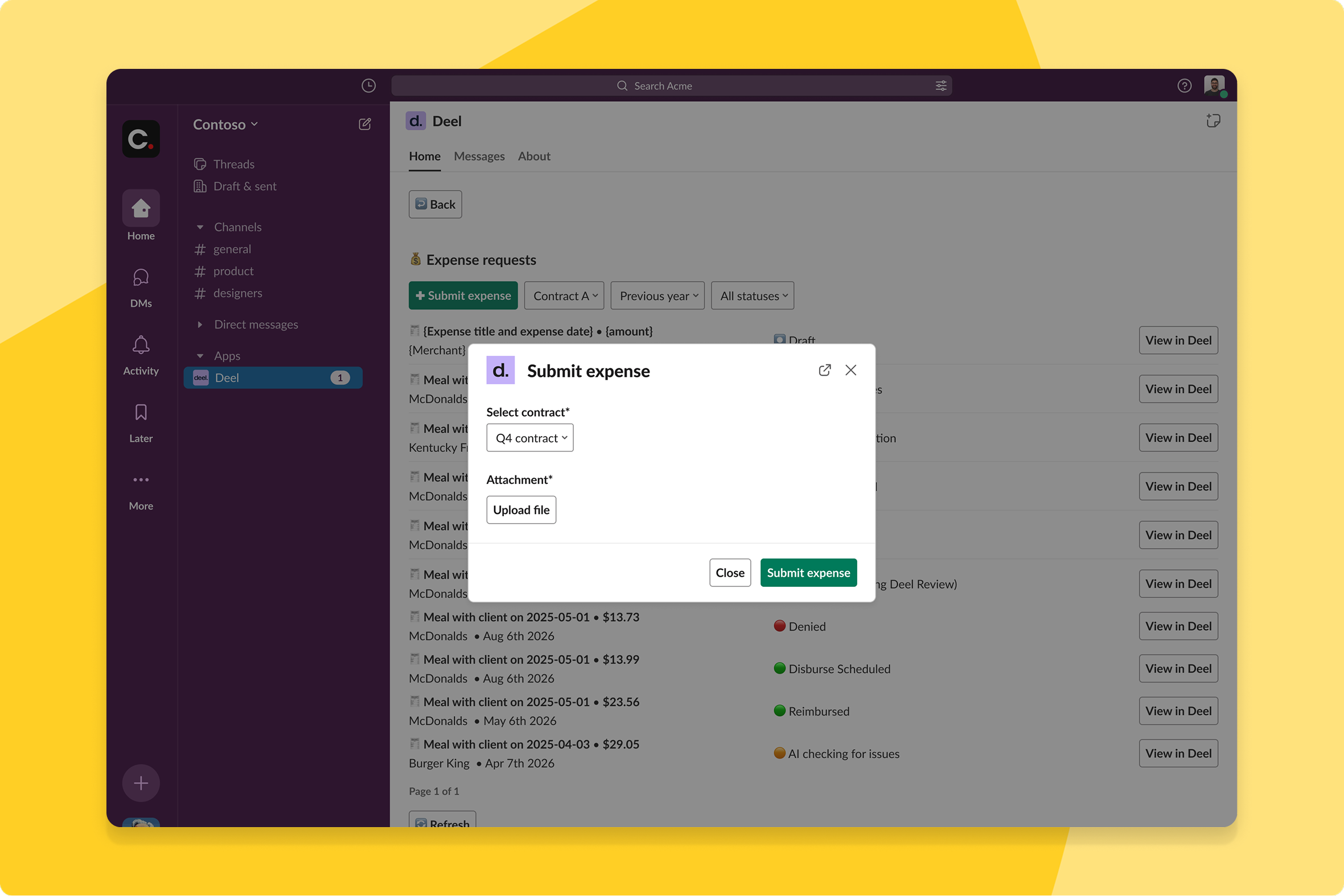
Expense submission from Slack and Teams
Expense reporting is now effortless without leaving Slack or Teams — upload a receipt or invoice, and Deel creates the draft using OCR and AI, runs policy checks, and notifies you when it's ready to review.
What this means for you: No more context-switching or chasing down lost receipts. By meeting your team in the tools they love, you’ll see faster submissions and fewer late filings.
How you can prepare: No action needed — this rolls out automatically to eligible organizations. Upload a receipt directly from Slack or Teams to try it.
Conditional custom fields logic
Admins can now build conditional logic between custom fields and organize them into named, reorderable groups in HRIS. Fields appear or hide based on a related field's value, and your chosen field order displays consistently across worker profiles, contract pages, and org structure records.
What this means for you: Onboarding and data collection forms only show what's relevant to each scenario, instead of every field for every worker type — and the fields that do show up follow the order and grouping your team actually works in, instead of relying on naming workarounds to fake an order.
How you can prepare: Set up dependency rules and field groups in Manage Custom Fields under Org Settings. No action needed to migrate — all existing fields are automatically assigned to a "General" group.
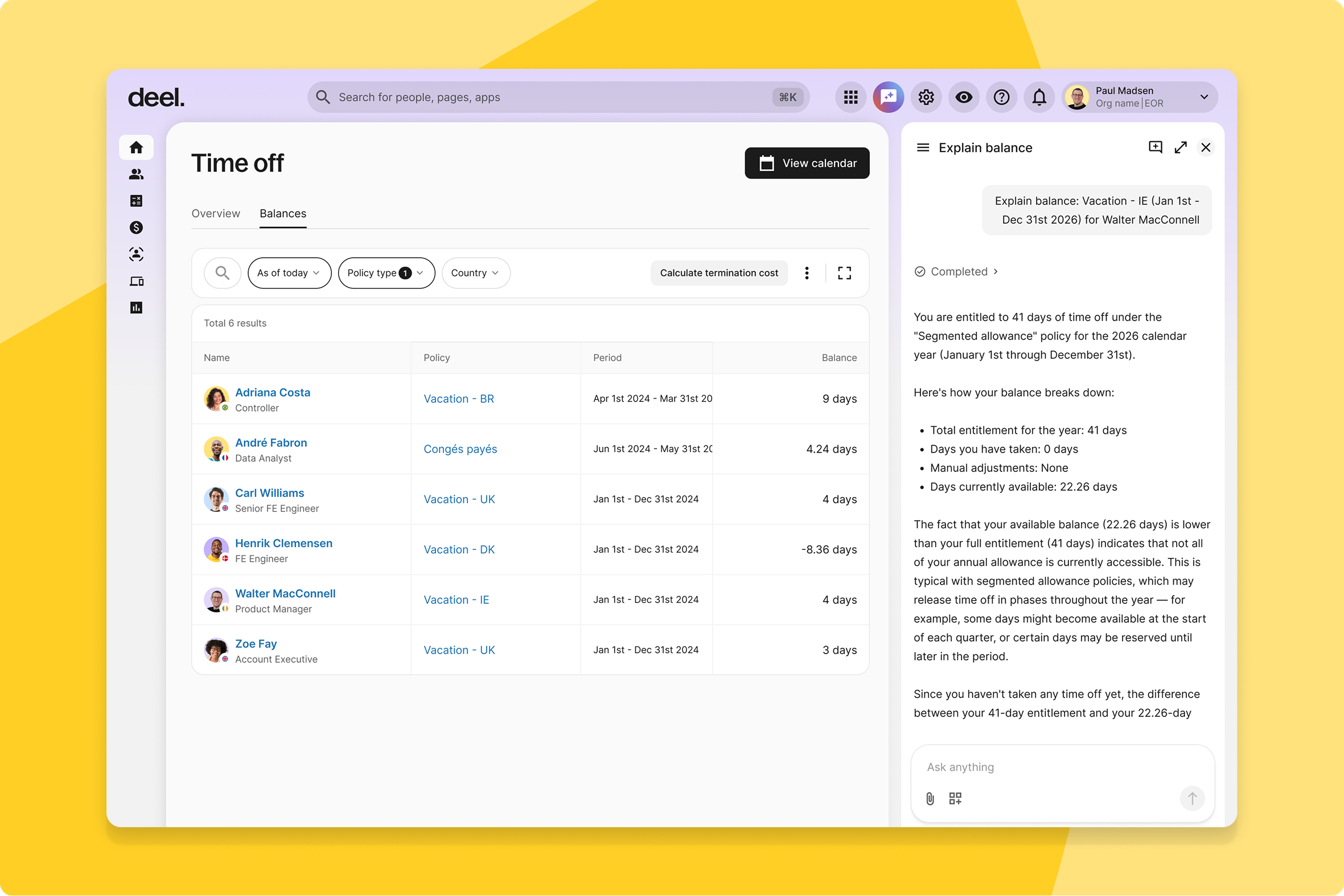
Instant time-off balance explanations
Workers can now click "Explain balance" on any time-off entitlement and get a plain-language breakdown from Deel AI of exactly how the number was calculated, accrual by accrual.
What this means for you: Workers get answers without opening a support ticket, and HR spends less time manually explaining balance calculations.
How you can prepare: Workers get answers without opening a support ticket, and HR spends less time manually explaining balance calculations.
IP-based clock-in restrictions
Admins can now restrict clock-in and clock-out to specific IP addresses, like office networks.
What this means for you: Time only gets logged when workers are actually connected through an approved network, adding a real layer of presence verification.
How you can prepare: Reach out to your Deel account team to configure approved IP addresses for your work locations.
Engage
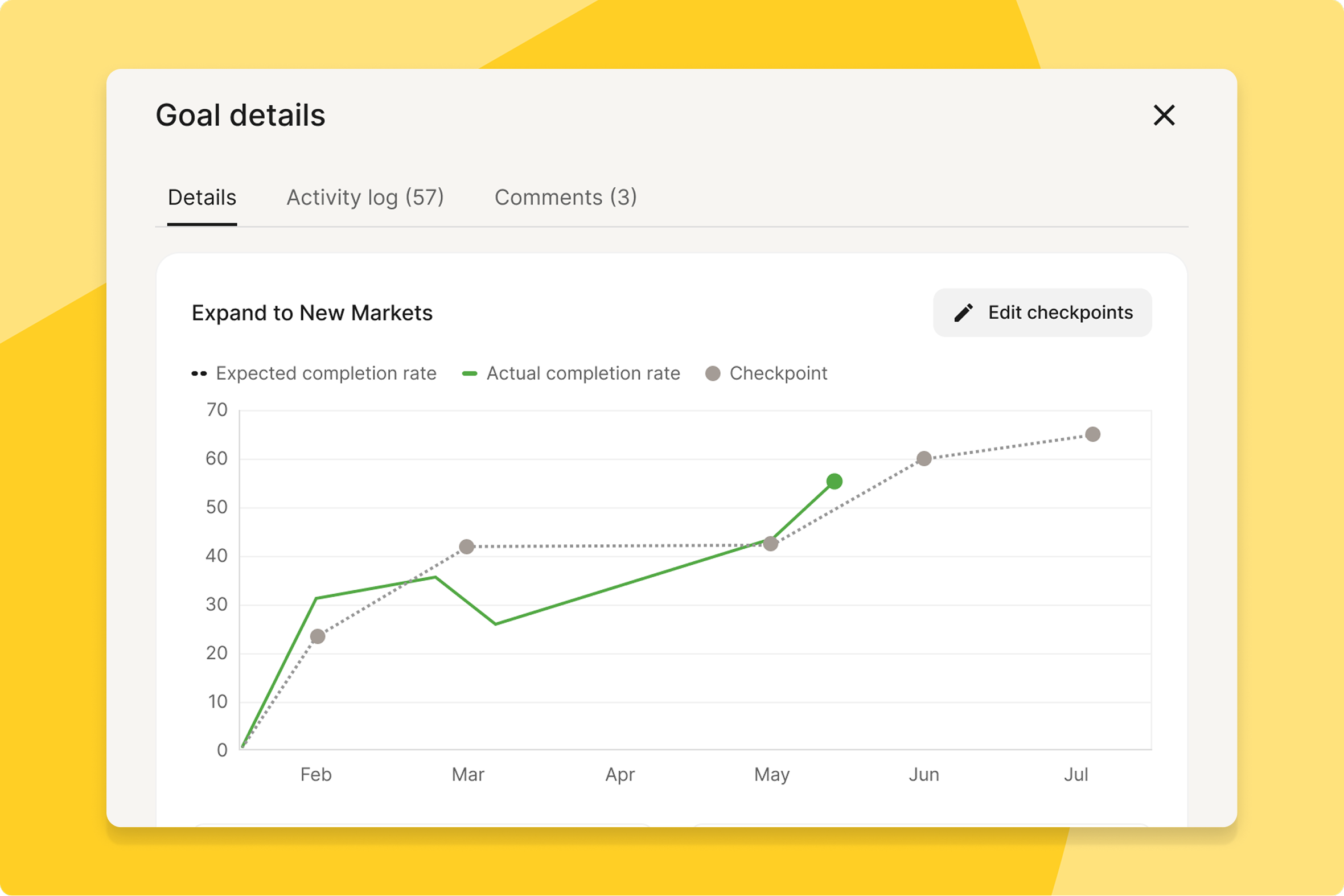
Goal checkpoint tracking
Goal owners can now place checkpoints on the goal timeline to define a custom expected progress curve, with progress measured against that curve instead of a straight line.
What this means for you: Goals that grow in phases or non-linear steps get accurate status tracking instead of looking falsely off-track against a flat line.
How you can prepare: No action needed — add checkpoints directly on the goal timeline chart.
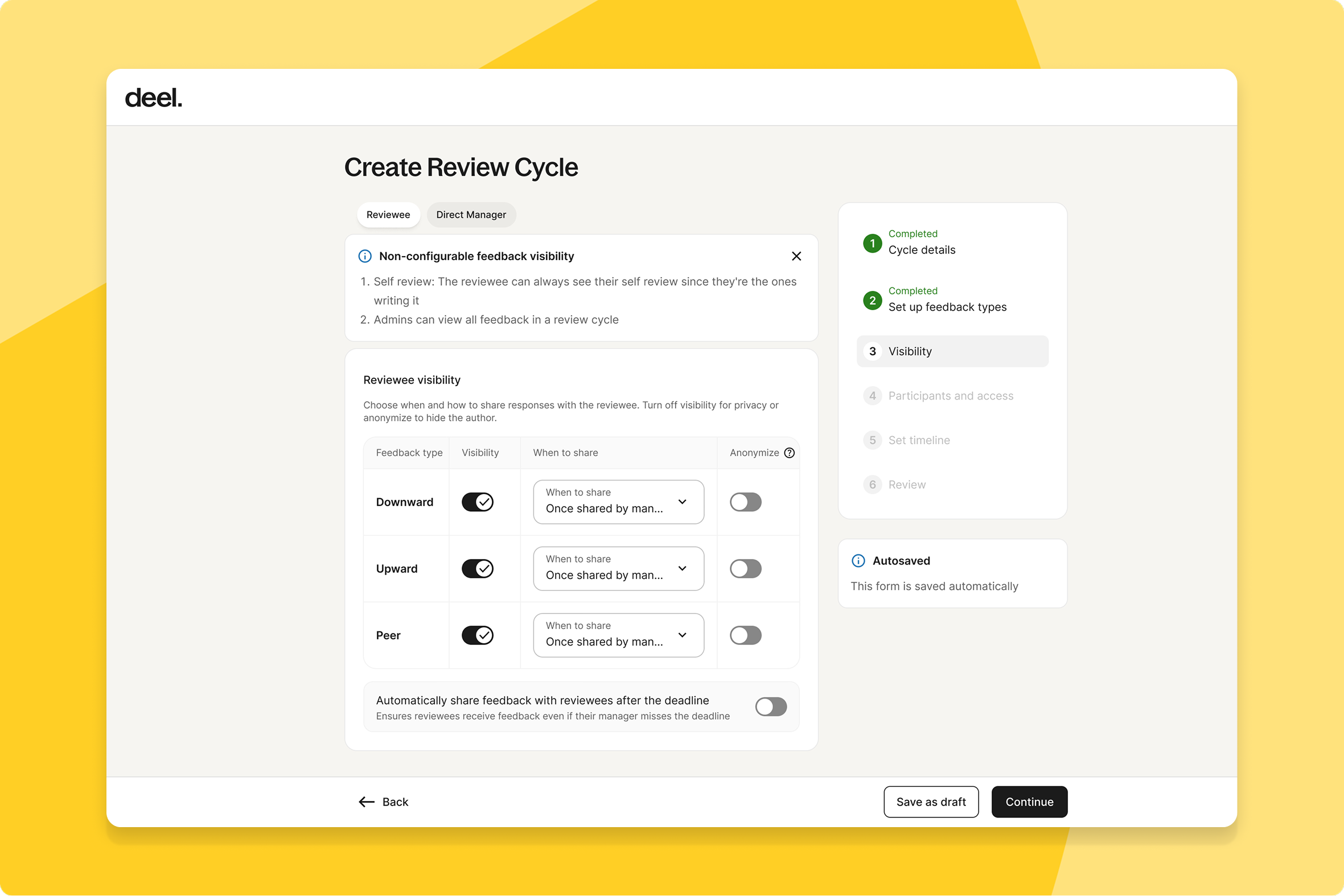
Unified visibility settings for review cycles
Admins setting up review cycles can now manage all visibility settings in one clearly structured step, replacing scattered configuration options.
What this means for you: Controlling who sees what during cycle creation takes one pass instead of hunting across multiple settings, cutting down on setup errors.
How you can prepare: No action needed — available automatically.
Automated survey translations
Admins running global surveys can now automatically translate sections, titles, questions, and rating scales into multiple languages, with employees choosing their preferred language to respond.
What this means for you: Multinational teams get fairer, more consistent feedback because language is no longer a barrier to participating honestly.
How you can prepare: Select your target languages when building a survey and define any custom translation rules in the prompting section — preview translations before publishing. Learn more at help.letsdeel.com/deel-engage-surveys.
Structured competency framework redesign
Admins and managers can now build structured, reusable competencies with proficiency levels, groups, and skills, using redesigned authoring and viewing experiences.
What this means for you: The same competency framework now applies consistently across career development, performance reviews, and hiring, instead of being rebuilt for each.
How you can prepare: No action needed — explore your redesigned frameworks in the Career section of Engage.
Ready-made content in one place
Admins and workers can now find all ready-made learning content — partner courses and free Deel Academy content — on a single page.
What this means for you: Discovering and assigning training takes one search instead of checking multiple sources.
How you can prepare: No action needed — simply browse the new content library in Learning.
Audit-ready compliance programs
Admins managing mandatory training can now run compliance programs directly in Engage, with per-course renewal, clear validity periods, and status-driven tracking.
What this means for you: Certifications stay current and audit-ready without relying on a separate external compliance tool.
How you can prepare: No action needed — existing programs are auto-migrated with no data loss.
Fix a cycle question without restarting
Admins can now correct typos in question titles, descriptions, and text during an active review cycle, with a confirmation modal guiding each edit so changes apply smoothly without notifying participants or disrupting existing answers.
What this means for you: A small wording fix no longer means restarting the cycle or living with a visible typo until it ends — admins can correct it in place, safely.
How you can prepare: No action needed — available automatically.
Talent
Automated AI candidate sourcing
Clients using Talent's AI-vetted marketplace can now receive qualified candidate matches proactively, with Slack notifications, instead of searching the talent pool manually.
What this means for you: Hiring teams build momentum faster on open roles without spending time browsing — strong matches come to you as they're found.
How you can prepare: No action needed — automated sourcing is available now. Reach out to your Deel contact for more on how matches are surfaced.
Deel Payroll
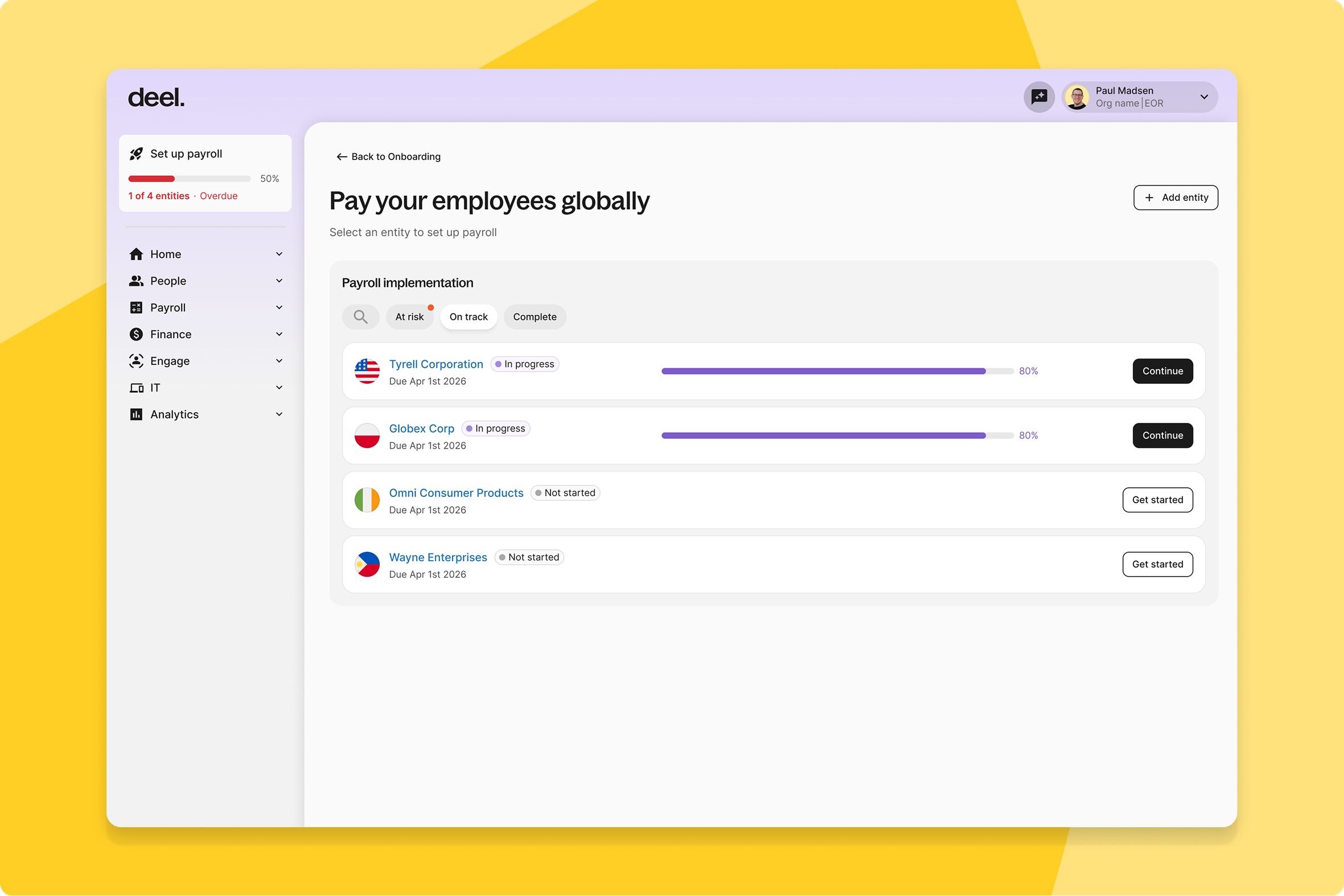
Unified multi-entity onboarding view
Admins and payroll leads onboarding multiple entities now get a dedicated Payroll Entity List page showing every entity's status at a glance, with at-risk entities surfaced first and search across large portfolios.
What this means for you: Teams managing dozens of entities can spot what's falling behind before it threatens an onboarding deadline, instead of checking each entity individually.
How you can prepare: No action needed — clients onboarding more than one entity see the new page automatically; single-entity clients go straight to the payroll checklist as before.
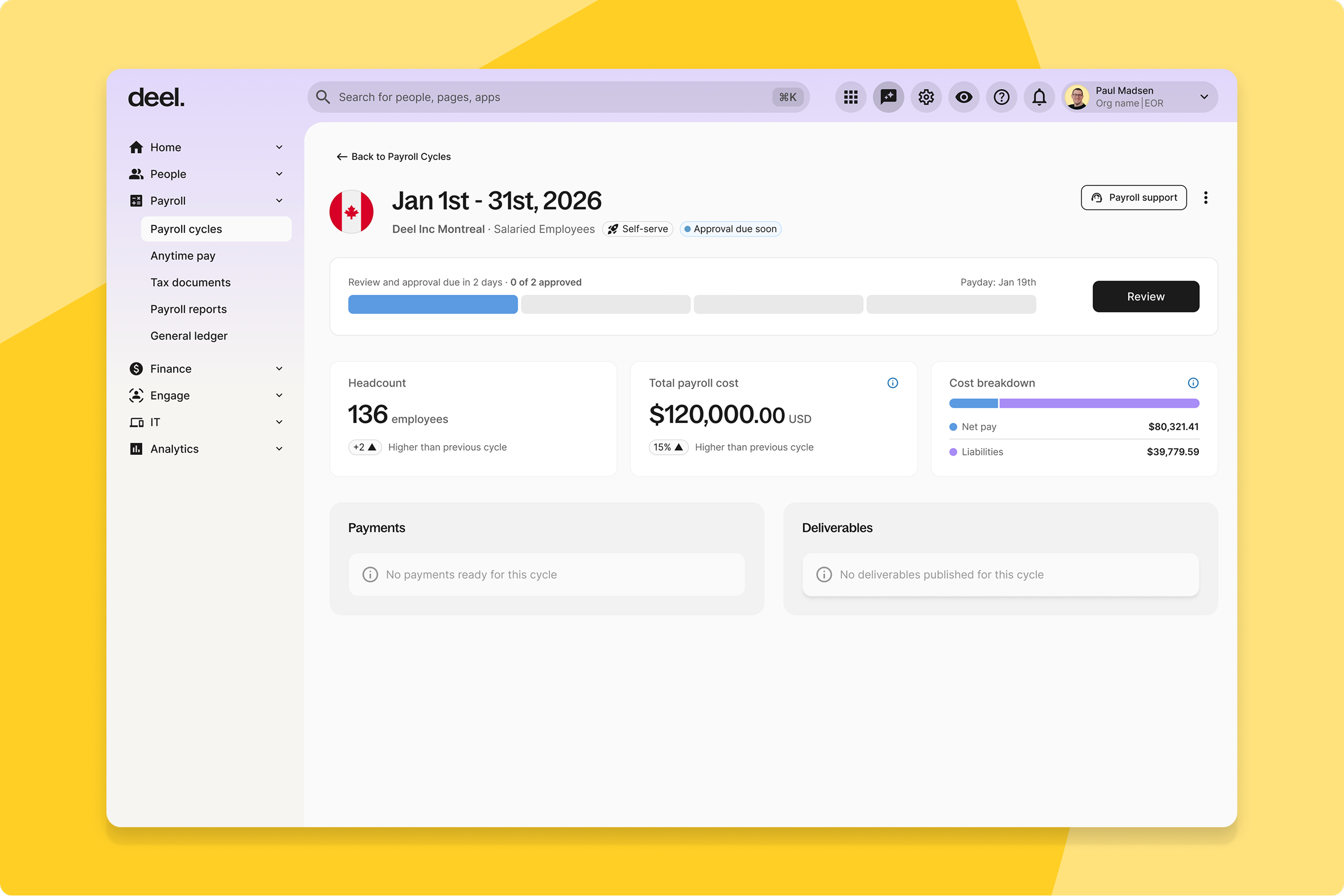
Unified submission landing page
Admins on Deel Payroll now get a dedicated Overview landing page as the entry point to a redesigned submission experience, bringing cycle metrics, actionable checks, and change previews together in one step-by-step flow.
What this means for you: You start each submission cycle knowing exactly what needs attention, instead of piecing that picture together from separate screens.
How you can prepare: No action needed — available automatically to Deel Payroll clients.
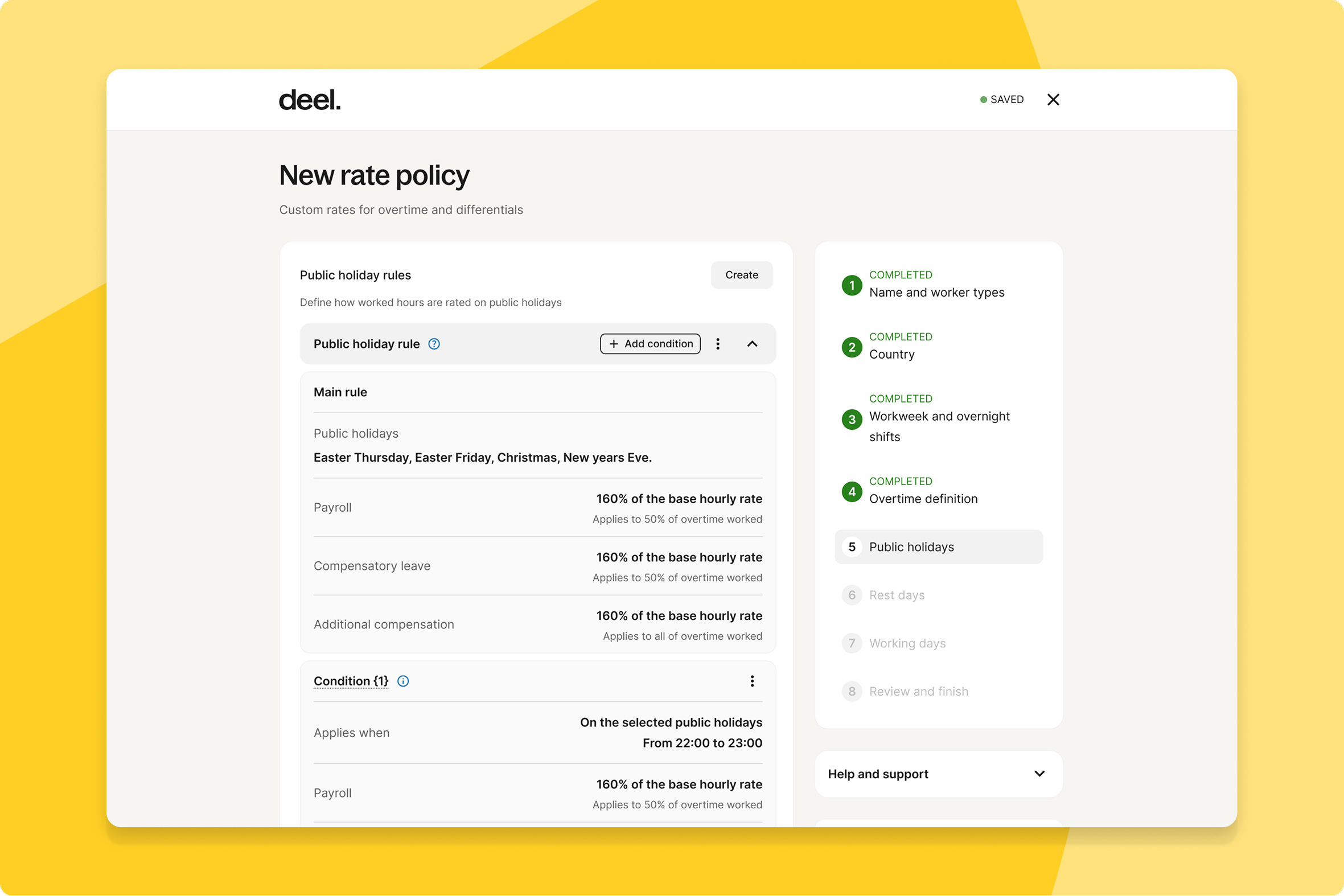
Split overtime pay methods
Admins can now create overtime compensation methods that split pay across TOIL and Payroll by exact percentage, plus add a premium pay rate independent of either component.
What this means for you: Overtime compensation can match how your organization actually wants to reward it, instead of forcing a single method across the board.
How you can prepare: Define your split and premium rate the next time you create an overtime compensation method.
AI builds employee contracts in minutes
Admins onboarding Deel Payroll employees can now upload a signed employment agreement and let an AI agent extract every contract field automatically, filling any gaps through a short conversational chat.
What this means for you: A validated, ready-to-review Deel Payroll contract is ready in under two minutes, with no manual form entry.
How you can prepare: No action needed — upload the signed agreement in the Deel Payroll employee creation flow and let the agent do the rest.
Employer of Record
Custom EOR time off policy creation
Clients can now create their own policies for leave types Deel doesn't yet offer in a given country — like bereavement or birthday leave — which apply automatically to all Employer of Record workers there.
What this means for you: You can close benefit gaps for your EOR workforce without waiting on Deel to build country-specific policy types first.
How you can prepare: This rolls out per country — once activated for yours, create new policies directly in your policy settings.
Scheduled and automated Anytime Pay withdrawals
Employees using Anytime Pay can now set a recurring schedule for their advance pay withdrawals instead of requesting each one manually.
What this means for you: Employees get consistent, predictable access to earned wages with less manual effort — and fewer one-off requests for your team to field.
How you can prepare: No action needed. Employees can set up scheduled withdrawals from their dashboard once live.
Unified mass onboarding framework
Admins onboarding multiple workers can now use a unified Mass Import framework for Employer of Record, with AI-powered CSV mapping and a centralized dashboard for tracking progress and resolving errors.
What this means for you: Large-scale onboarding gets faster and more consistent, with one place to see what's processed, what failed, and what needs fixing.
How you can prepare: No action needed. Check the bulk onboarding guide at help.letsdeel.com.
Contractor
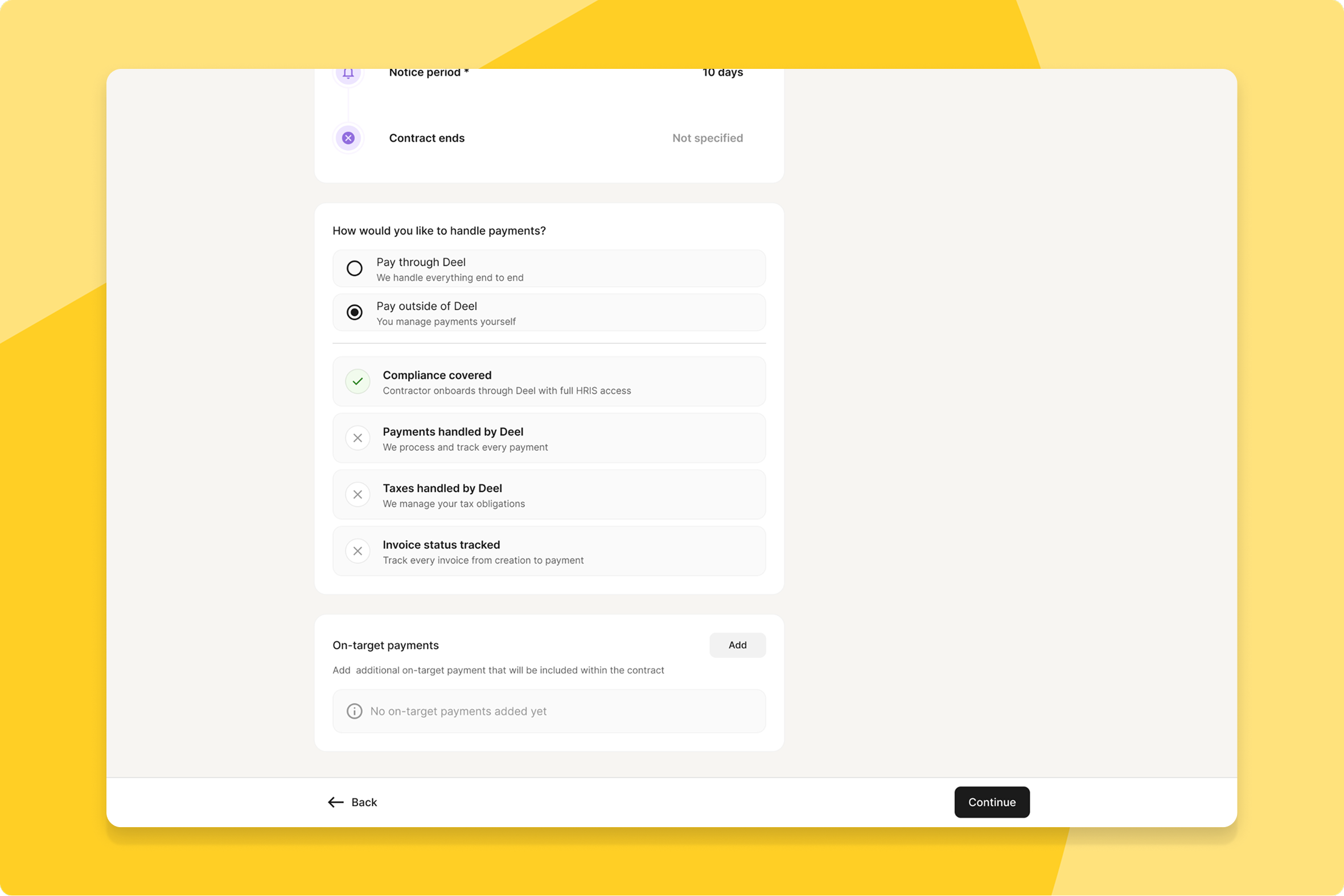
Compliant, even for contractors paid outside Deel
Clients can now onboard contractors into Deel even when payments run through a separate system, bringing contractor management, compliance, and HRIS access into one platform without touching existing payment arrangements.
What this means for you: Teams get a single, compliant record for every contractor — including the ones you pay elsewhere — without a payments migration.
How you can prepare: No action needed. See the guide at help.letsdeel.com for setup details.
New permissions framework migration
Clients now run on a more robust and flexible permissions framework underneath the platform.
What this means for you: Contract flows behave more consistently, with fewer permissions-related inconsistencies to work around.
How you can prepare: No action needed — this is automatically available.
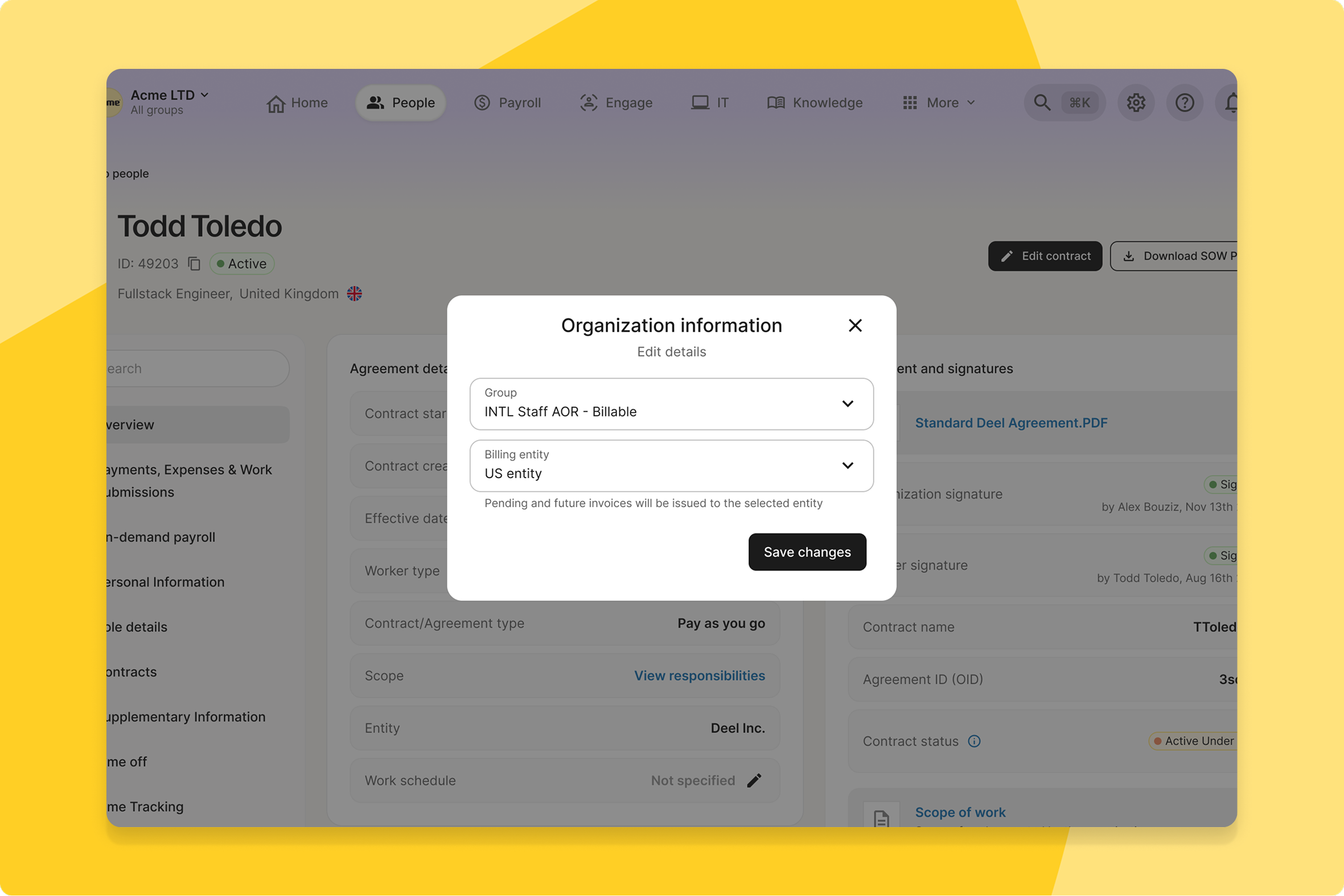
Redesigned Advance mobile experience
Contractors now get a fully redesigned Deel Advance experience built natively for mobile, replacing the previous web-based components.
What this means for you: Requesting and managing advances from a phone is faster and more intuitive, with an interface built for mobile rather than adapted from web.
How you can prepare: No action needed — available automatically in the Deel mobile app.
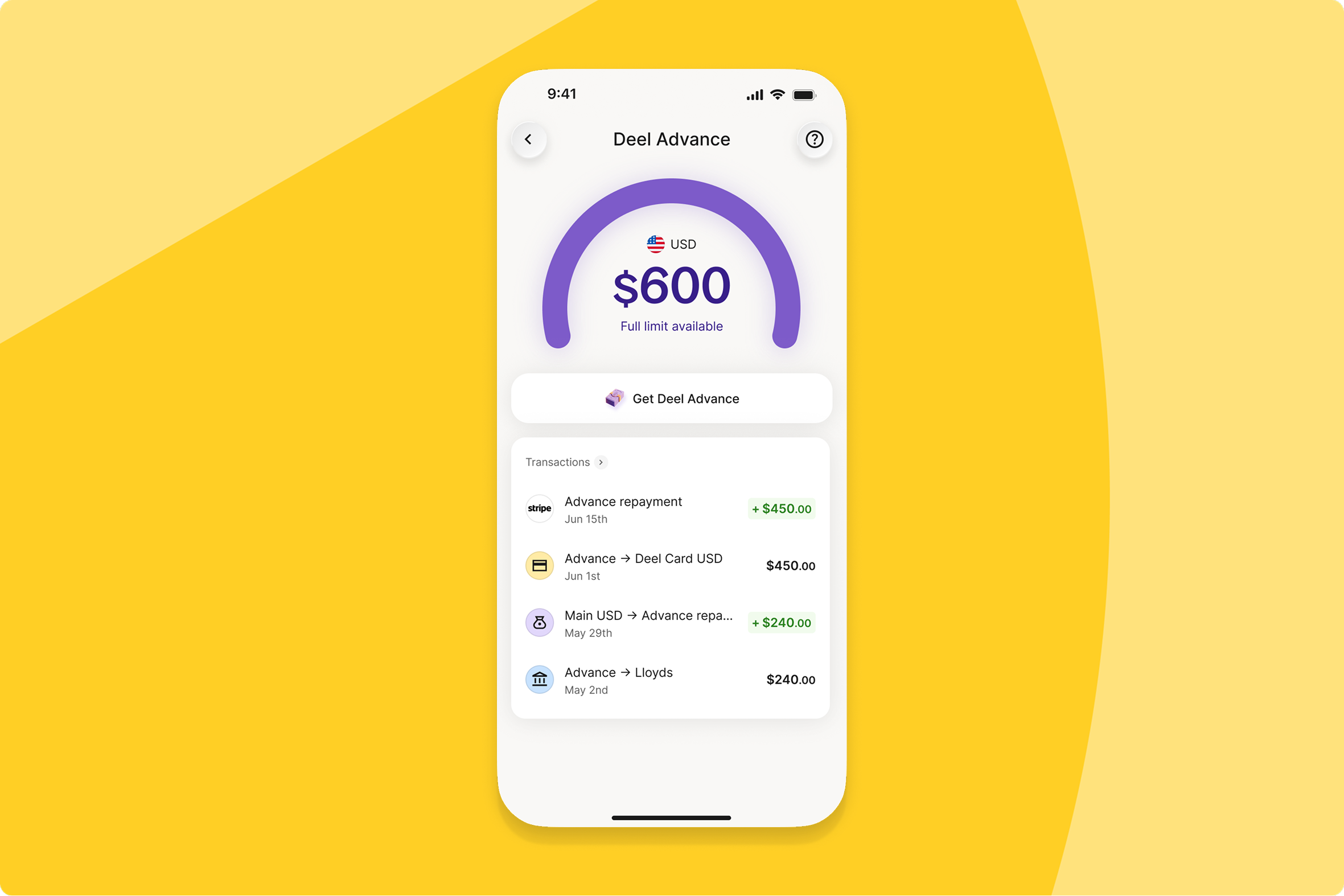
Self-serve legal entity changes
Admins can now change the legal entity on an active contract directly in-app, with automatic compliance validations that give instant confirmation for straightforward changes and route complex cases to a structured review.
What this means for you: Legal entity changes that used to require a support ticket now resolve in minutes for most cases, with a clear path for the ones that genuinely need legal input.
How you can prepare: No action needed — available automatically.
IC & COR templates to Template Manager
Independent Contractor and Contractor of Record agreement templates have been decoupled from Deel's codebase and migrated into the Template Manager tool.
What this means for you: Contract template management gets more efficient and consistent as more agreement types move into a single tool.
How you can prepare: No action needed — this is automatically available.
Mutual termination agreement visibility
Admins can now view the Mutual Termination Agreement from the moment it's generated, with real-time status updates, while contractors get a homepage task prompting them to review and sign.
What this means for you: Both sides can see exactly where a termination stands, cutting down on status-check messages back and forth.
How you can prepare: No action needed — admins find the MTA on the active contract profile and in the "End of contract" section automatically.
PEO
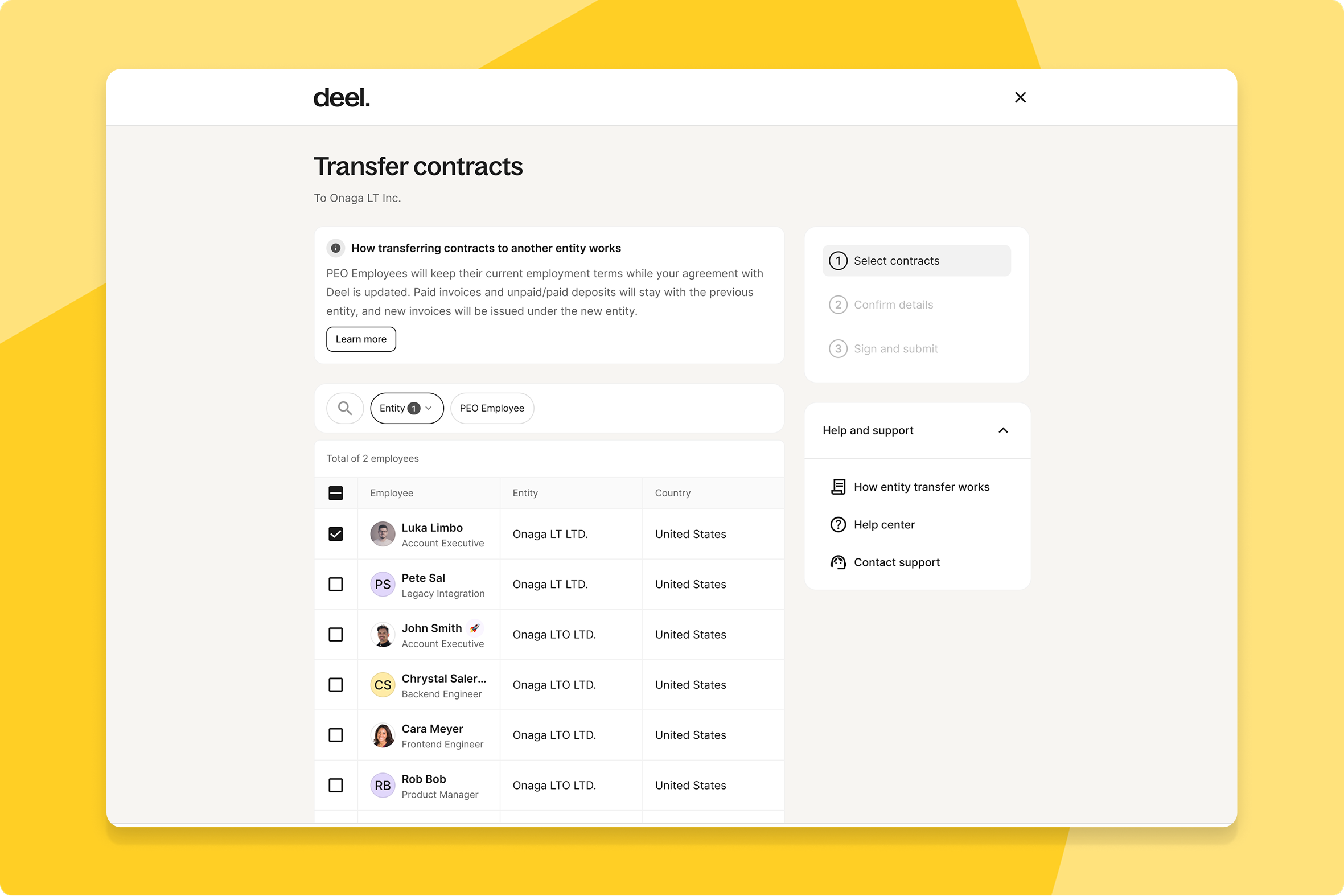
Self-serve employee entity transfers
Admins can now move employees between entities under the same organization through a self-serve flow, individually or in batches, without terminating and re-onboarding anyone.
What this means for you: Entity transfers that used to take a support ticket and days of back-and-forth now complete in minutes, with the employee's data, documents, and balances intact.
How you can prepare: No action needed — initiate a transfer directly from the employee profile.
Expense Management
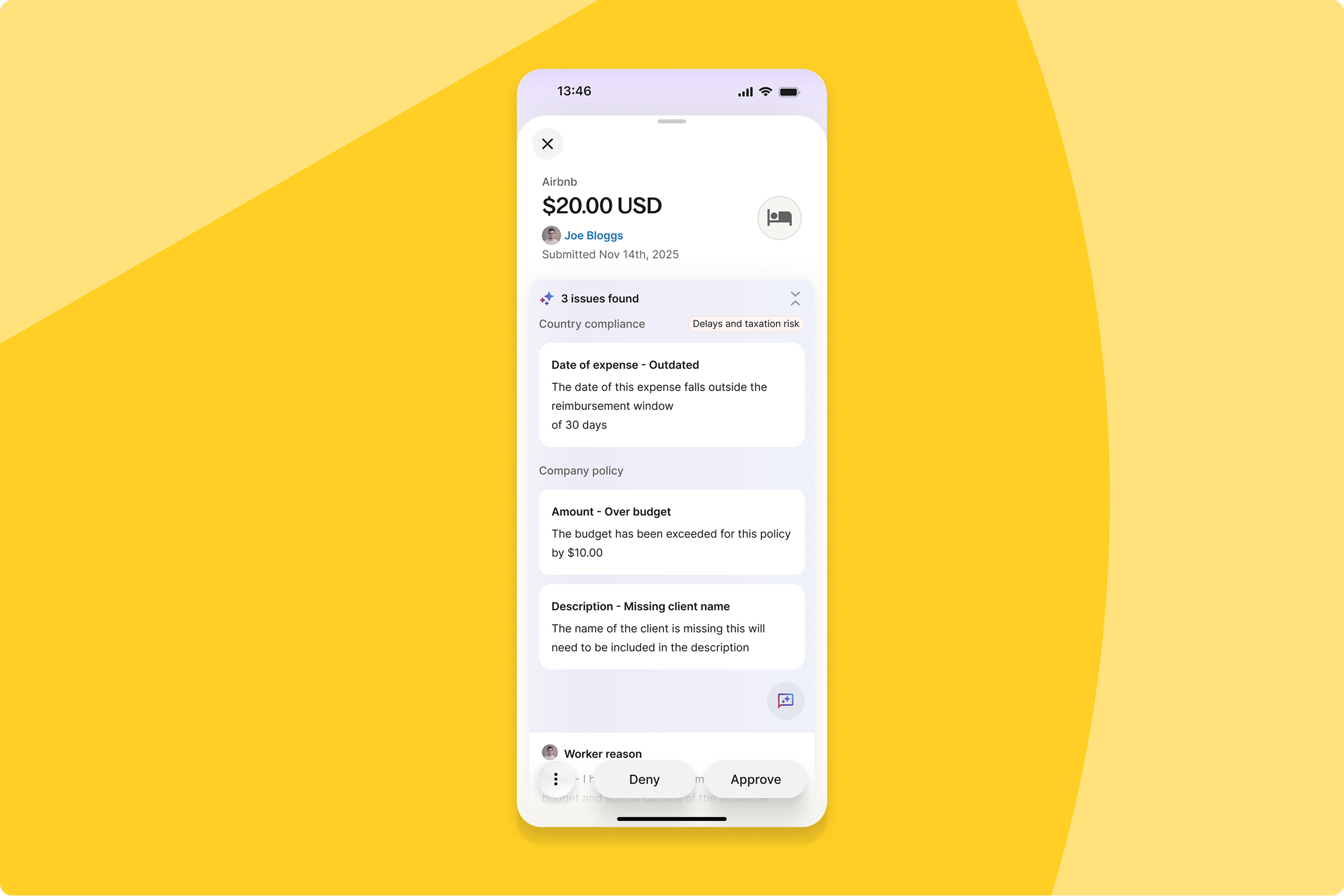
Redesigned expense detail view on mobile
Approvers reviewing expenses on mobile now see AI feedback as clear title-and-description cards grouped by Compliance and Company policy, with the worker's name moved into the header — bringing mobile in line with web.
What this means for you: Approvers get the same clarity on mobile that they already had on web, so review quality doesn't depend on which device you're using.
How you can prepare: No action needed — available automatically once enabled.
Global default category management
Admins managing expenses across multiple legal entities can now set one global default category configuration at the organization level, with a new Exceptions feature to tailor requirements for specific entities or individuals.
What this means for you: New entities inherit sensible defaults automatically, and teams that need something different can configure exceptions without rebuilding the whole setup.
How you can prepare: Visit your expense category settings to define organization-wide defaults, then add entity-level exceptions as needed.
Deel IT
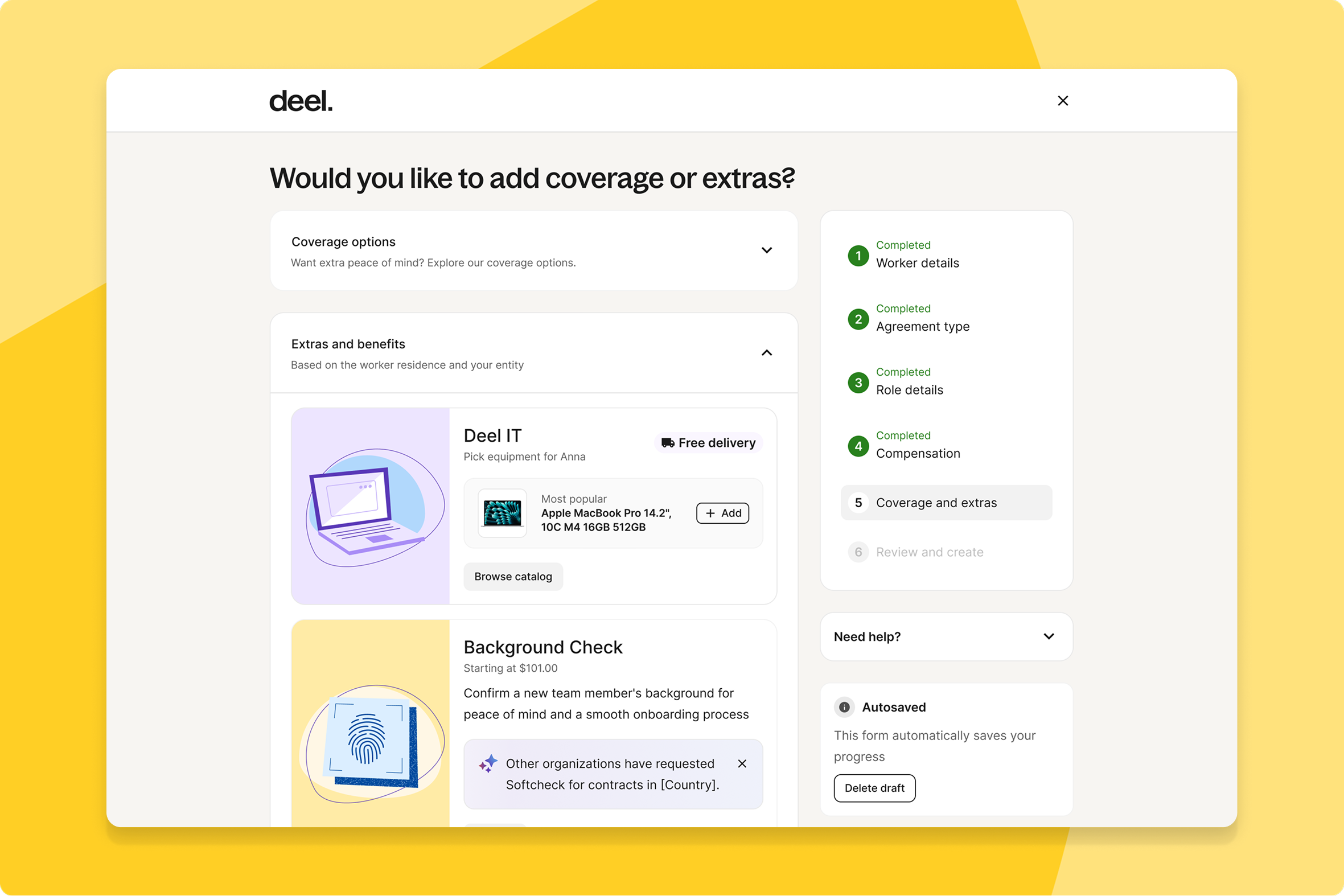
Equipment ordering in contract creation
Admins can now order equipment directly inside the contract creation flow, seeing recommended devices based on org history and country without leaving the contract interface.
What this means for you: New hires get equipped faster because IT no longer runs as a separate step after the contract is signed.
How you can prepare: No action needed for Essentials Tier admins — the equipment ordering unit appears in the Benefits & Extras step automatically.
Unified asset service workflow
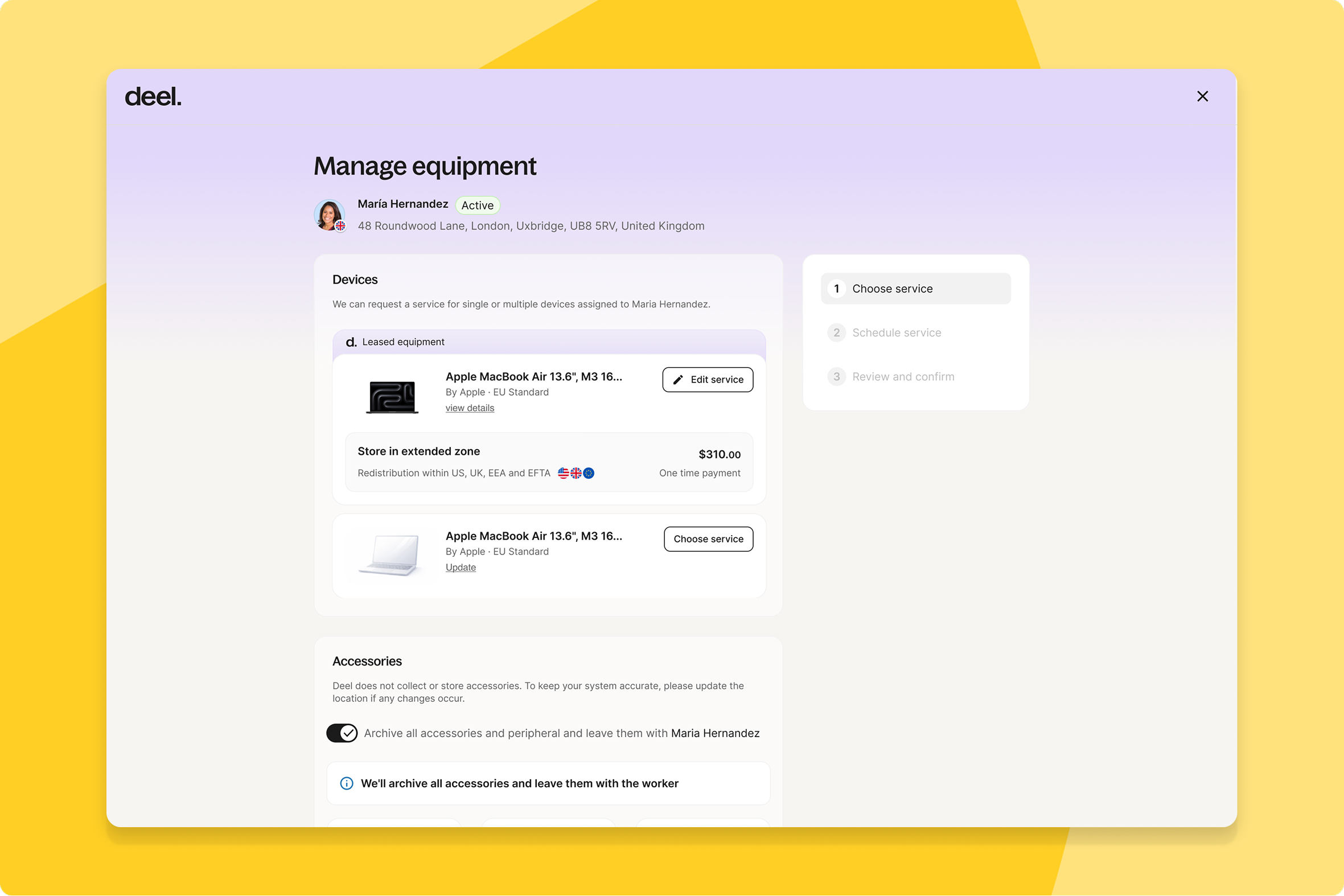
Teams can now manage every asset service request — store, reuse, reassign, or clear — in one workflow, with a global asset map and service availability lookup.
What this means for you: IT teams see where equipment actually is and what's available in each country, instead of tracking requests across separate tools.
How you can prepare: No action needed — available automatically to Deel IT clients.
AI-powered policy creation
Admins creating a new IT policy no longer start from a blank slate — Deel IT pre-fills a complete draft in one click by reading HR data, catalog availability, and usage patterns.
What this means for you: Setting up a new policy becomes a review-and-adjust task instead of a from-scratch configuration exercise.
How you can prepare: Click "Generate with AI" when creating a new policy during onboarding or from IT Settings.
Unified device management services view
Clients now get a single, unified view for all device management service requests.
What this means for you: Tracking and managing device services takes one view instead of several.
How you can prepare: No action needed — this is automatically available.
Deel Platform
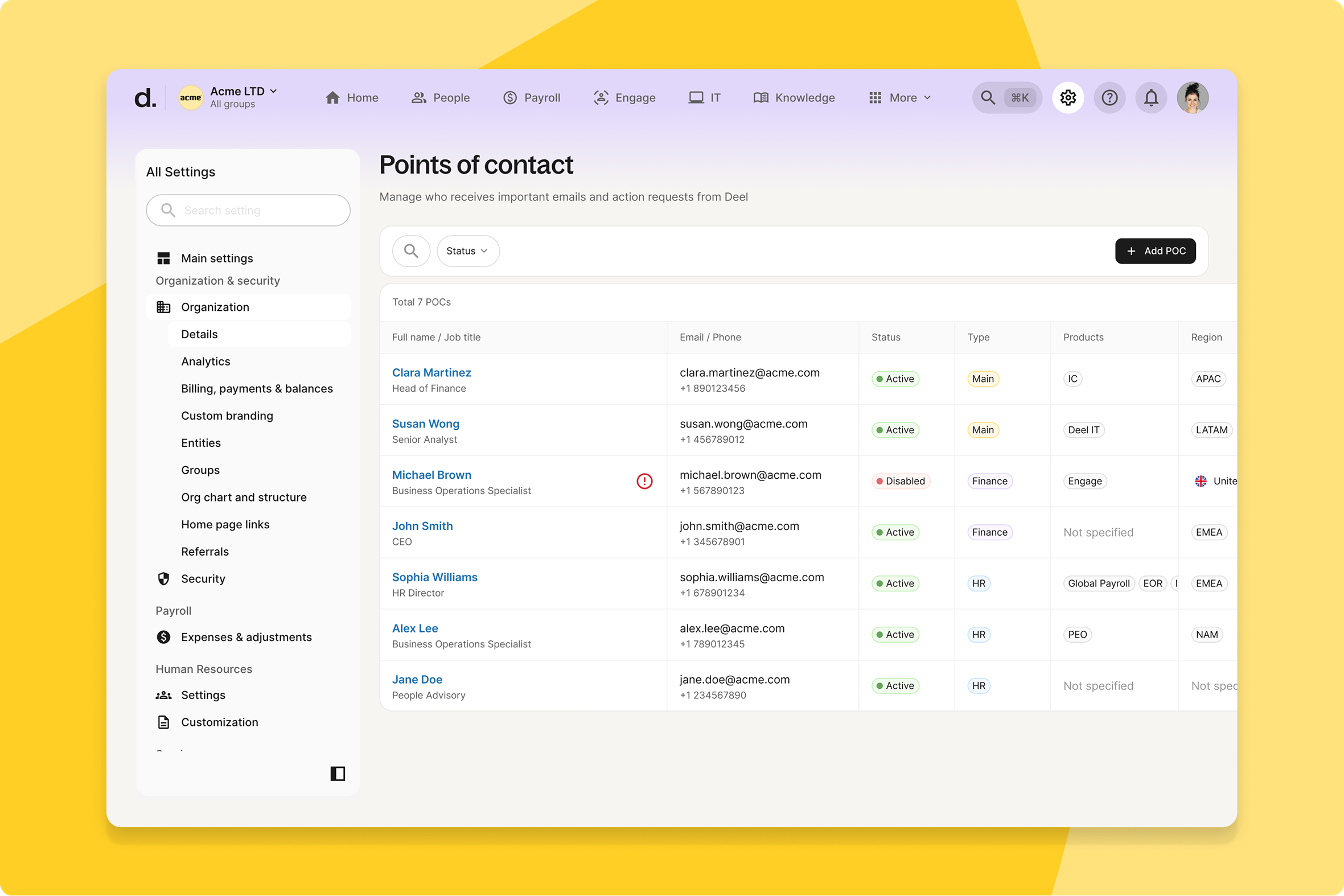
Client control for points of contact
Admins can now manage their Points of Contact directly in Organization Settings.
What this means for you: The right people get contacted at the right time, with less back-and-forth clarifying who owns what.
How you can prepare: No configuration needed — available automatically.
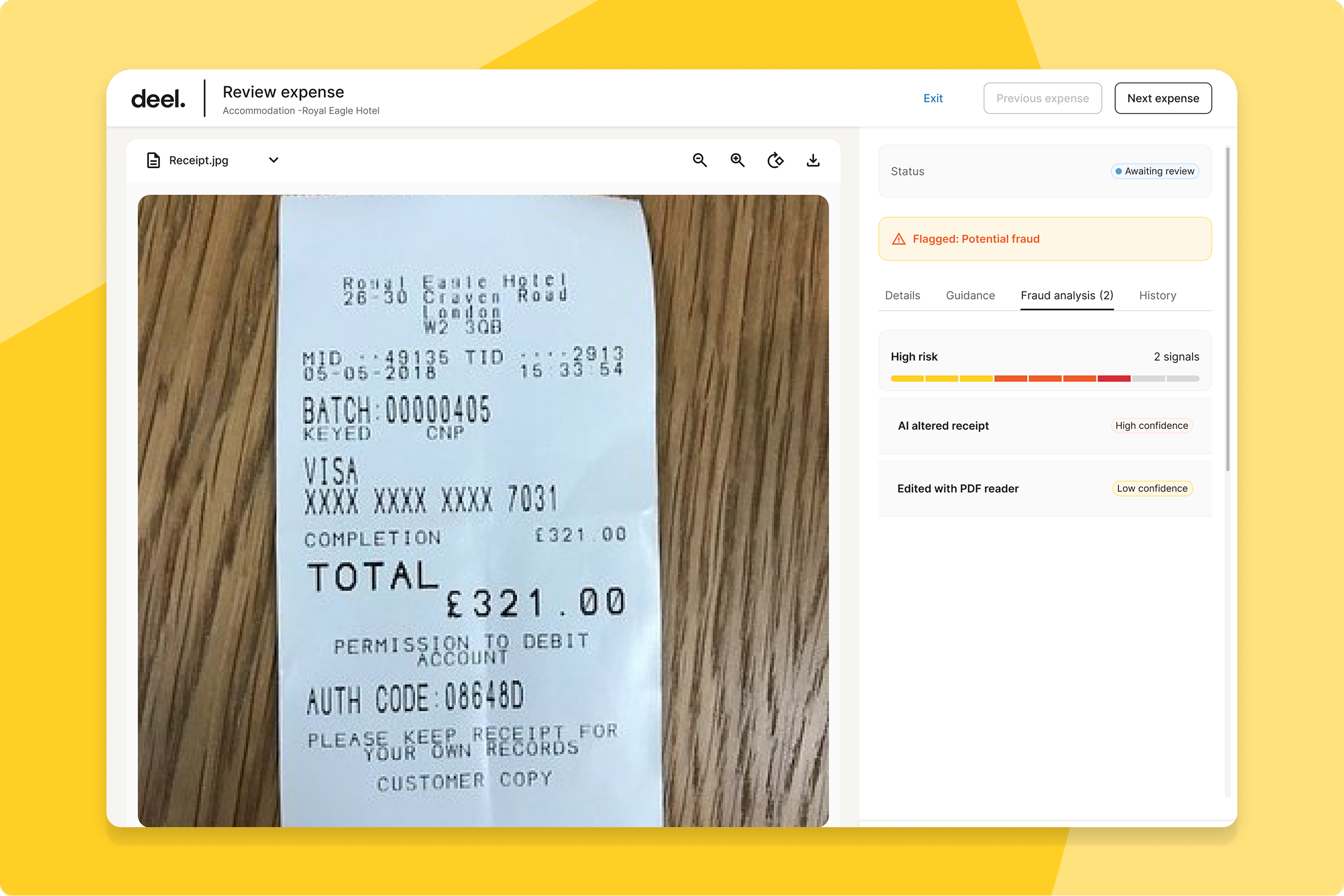
AI-powered expense fraud protection
Finance and operations teams now get automated fraud detection on expense documents. Powered by Akai, Deel flags tampering signals — modified PDFs, manipulation tools, hidden text — that manual review typically misses, and blocks flagged expenses from auto-approval.
What this means for you: Suspicious expenses get caught before they're paid, not after, cutting financial exposure without adding manual review steps for legitimate claims.
How you can prepare: No action needed — flagged expenses surface with structured fraud details for your operations team to review automatically.
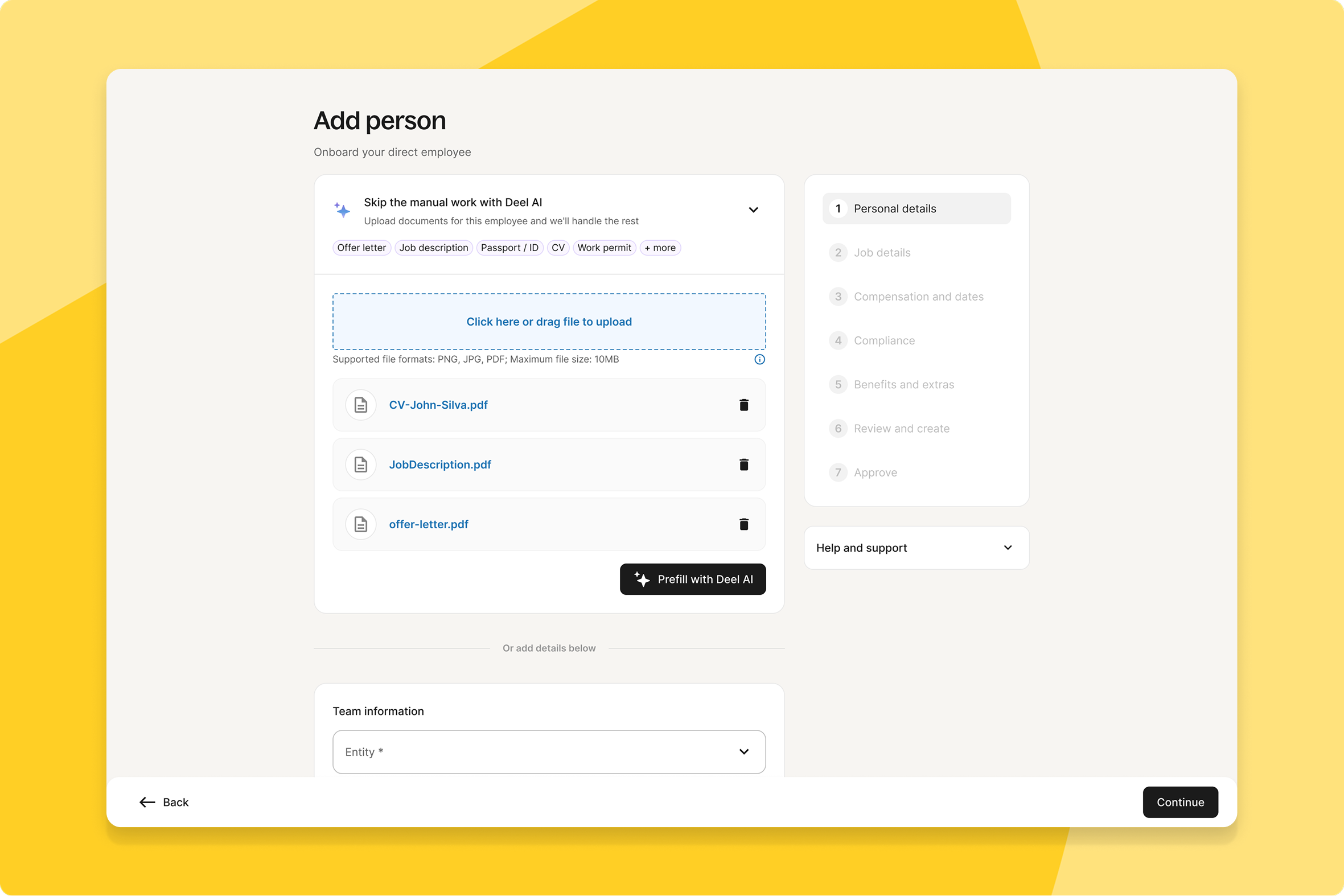
Contracts pre-filled from your documents
Admins can now upload an offer letter or CV when creating a contract, and Deel's AI agent reads it and pre-populates the relevant fields automatically — across Employer of Record, Contractor of Record, and Contractor workflows.
What this means for you: Contract creation takes less manual data entry and produces fewer errors, especially for teams onboarding at volume.
How you can prepare: No action needed — upload a document during contract creation and Deel pre-fills the rest.
Unified integration marketplace launch
Deel's full integration catalogue now lives in one place at marketplace.deel.com. Logged-in users see their connected apps, installation status, and personalized recommendations, while visitors get a fast, searchable storefront pulled from a single source of truth.
What this means for you: Finding and evaluating a new integration no longer means hunting across separate pages — everything you're connected to, and everything you could connect next, shows up in one searchable view.
How you can prepare: No configuration needed — existing install and connect flows keep working, and the personalized view appears automatically once you're logged in.
Native mobile time off management
Workers can now request, view, edit, and cancel time off in a native mobile experience for iOS and Android, with vacation balances, upcoming holidays, and accrual progress visible at a glance and an in-app AI assistant for quick questions.
What this means for you: Workers manage time off without switching to desktop, and HR fields fewer basic balance questions since the AI assistant answers them directly.
How you can prepare: No action needed — update to the latest version of the Deel mobile app to see the new experience.
Approve expenses with issues on mobile
Reviewers can now resolve expenses flagged with compliance or policy issues directly from the Deel mobile app, using a new "Approve with issues" flow for items over $50.
What this means for you: Approvers clear flagged expenses on the spot instead of switching to desktop, keeping reimbursement cycles moving.
How you can prepare: No action needed — the option appears automatically on the expense detail view in the mobile app.
Client-facing release visibility and control
Admins now get a dedicated Releases tab showing upcoming, future, and past releases grouped by version and product line, with a formal workflow to request feature disablement.
What this means for you: You get real visibility into what's shipping and when, plus a governed way to opt out of a specific release instead of an ad hoc support request.
How you can prepare: No action needed — find the Releases tab under Settings → Organization & Security, and submit a disablement request with your reason if needed.
Document review agent
Admins can now have an AI agent review uploaded documents against set criteria instead of checking them manually.
What this means for you: Document review takes less admin time and catches issues more consistently.
How you can prepare: No action needed — this is automatically available.
Manual overtime policy assignment
Admins managing Time Tracking can now assign overtime and differential policies to specific individuals, not just by country or contract type, with safeguards against assigning anyone to more than one policy.
What this means for you: Teams can offer varied overtime terms across workers without restructuring country- or contract-level policies to do it.
How you can prepare: Head to your overtime and differentials settings and search for workers by country, state, or contract type to assign a rate policy.
Automated overtime approval workflows
Admins can now build automatic approval workflows for time tracking in the Workflow Builder, setting filters like overtime thresholds to auto-approve entries that meet your criteria.
What this means for you: Routine overtime clears itself, so managers spend review time on the exceptions that actually need judgment.
How you can prepare: Head to your time tracking settings to build custom approval workflows.
Auto-approval of pending shifts at cutoff
Admins can now turn on a setting that automatically approves any shifts still pending when the timesheet cutoff passes.
What this means for you: Payroll cycles stay on schedule even when a manager misses an approval deadline, so workers aren't the ones who pay for it.
How you can prepare: Turn on "Auto-approve all pending shifts for the current payroll cycle at the approval deadline" in your time tracking policy. Available for Deel Payroll, PEO, and US Payroll.
Overtime visibility in timesheets
Managers and workers can now see overtime categorization directly in timesheets and approval flows, not just payroll managers.
What this means for you: Reviewers understand exactly what they're approving — and why it's overtime — before signing off, instead of taking it on faith.
How you can prepare: No action needed — available automatically for eligible contracts with interpretation enabled.
Redesigned expense detail view
Client reviewers can now see everything needed to approve an expense in one screen — receipt, expense fields, status, Issues, Activity, and Policy — without scrolling or switching tabs.
What this means for you: Approving an expense takes one pass instead of piecing context together across multiple views.
How you can prepare: No action needed — available automatically.
Own entity confirmation step
Clients choosing to hire through their own entity now see a confirmation step highlighting key compliance and tax considerations, with Contractor shown as a supported alternative for comparison.
What this means for you: Teams make the own-entity decision with the relevant tradeoffs in front of them, rather than discovering them later.
How you can prepare: No action needed — this appears automatically when selecting a hiring option.
Task assignment to dynamic groups
Admins can now assign a custom task to an entire dynamic group — like all Payroll or EOR workers — in one step, using the same grouping already used for folders.
What this means for you: Rolling out a task to a whole worker segment takes one action instead of selecting people one by one.
How you can prepare: No action needed. Learn more about creating tasks at help.letsdeel.com
Configurable task reminders migration
Admins now get more flexible task reminders as Deel migrates to a centralized Reminders Framework, with timing, copy, and channel adjustable without an engineering deploy.
What this means for you: Reminder tweaks that used to wait on an engineering release can now happen quickly, with more reliable delivery across task types.
How you can prepare: No action needed — this is automatically available.
Unified mobile inbox for tasks
Admins, managers, and workers can now see all pending Approvals and Tasks in a single native mobile inbox, with granular rows replacing vague aggregate items so you know exactly what needs action.
What this means for you: You know precisely what's waiting on you from your phone, instead of opening several aggregate notifications to find out.
How you can prepare: No action needed — open the Deel mobile app to see your unified list.
Fillable form re-submission
Employees can now re-submit a fillable form even when one already exists, keeping the Employee Data Management flow intact so downstream services receive the updated data through the normal path.
What this means for you: Correcting a submitted form no longer creates a broken or duplicate record downstream.
How you can prepare: No action needed — this is automatically available.
What’s shipped over this past month
ATS
AI-powered candidate screening
Recruiters can now build AI screening bots that evaluate candidates against clear, binary pass/fail criteria instead of manual review or opaque percentage matching.
Pro subscription and credit management
We've enhanced ATS Pro with better credit management and admin controls. Admins can now track credit usage across your organization, allocate credits to teams, and manage your subscription and invoicing. Stay in control of your AI hiring budget with full visibility into spend and usage. Want to dive in? Check out this product tour.
Smarter interview scheduling controls
Recruiters can now build reusable interviewer pools, set weekly interview limits, and rely on round-robin assignment, with clearer controls to cancel, reschedule, and resend interview links.
Smarter offer management controls
Recruiters and hiring teams can now set offer approval policies, add expiration dates, and configure re-approval triggers, plus edit offer status after candidate responses.
Talent
AI candidate scoring
Hiring teams can enable AI-driven candidate scoring that instantly assesses CV-to-role fit, surfacing sortable match scores and AI-written reasoning in each candidate's detail view.
HRIS
Clearer worker classification fields
Deel renamed "Worker Type" to "Service Model" and added new classification fields — visible across the People List, profiles, and reporting — for a more accurate picture of your global workforce.
Hierarchical job architecture tree view
Admins can now navigate the full Job Family Group › Job Family › Job Profile hierarchy in one expandable tree view instead of a three-tab layout.
Workforce Planning
Scoped worker visibility by org unit
Admins can grant workers Workforce Planning access scoped to specific departments or teams, so they see only the positions within their assigned scope.
Structured position request justifications
Managers requesting new positions now complete labeled business justification, impact, and scope fields instead of free text, giving approvers a decision-ready case.
Compensation
Multi-root org hierarchy support
Admins now see every manager and every branch in the comp cycle budget view — previously, orgs with multiple entities or post-acquisition structures could have entire branches silently hidden.
Initial equity grant bands
Comp and HR admins can now define equity ranges (Min/Mid/Max) for each role directly in Deel, alongside existing salary and target bonus bands, giving teams one source of truth for total compensation.
Configurable role details field visibility
Admins can now control which compensation fields appear in the Role details widget on the worker profile Overview page, using simple toggles in Settings to tailor visibility across all workers.
Deel Payroll
Multiple bank account support
Workers on the Workday PECI integration can now split their salary across multiple bank accounts per pay cycle, with admins configuring the split by fixed amount, percentage, or remaining balance.
Employer of Record
Late starter processing support
Clients can now process late starters within the correct pay month using correction cycles, instead of waiting for the next payroll cycle.
C-Level job titles enabled
Clients hiring executives through Employer of Record can now select CEO, CFO, and COO titles directly in the quote flow, with a compliance notice mapping each title to its legal designation.
PEO
Dedicated general ledger process
Teams setting up PEO now get a General Ledger process built for how PEO actually works, with entity type badges, PEO-specific filtering, and automatic GL total validation.
Employee waive reason capture
Admins can now capture the reason an employee waives benefits coverage directly within the benefits experience.
Deel Mobility
Employer-sponsored work permits self-serve
Admins can now file employer-sponsored work permits (H-1B, TN, E-3, L-1A) directly in-platform, with eligibility checks, upfront pricing, and no initial call required.
Self-serve individual work permits
Individuals can now self-qualify and file their own work permits online — including extraordinary ability, investor/entrepreneur, digital nomad, and self-petitioned green card categories — without booking a call first.
Deel IT
Centralized endpoint protection settings
Admins can now find their CrowdStrike Customer ID, sensor installers, and policy links in one place on a new Settings tab on the Endpoint Protection page.
Deel Platform
Zapier expansion coverage
Clients using Zapier can now automate more workflows, including account provisioning, worker creation, IT asset setup, and background check completions.
Train your team to get the most from Deel
Deel Academy runs live workshops built around what’s new on the platform—interactive, instructor-led sessions where your team can see the new features in action and ask questions in real time.