Article
6 min read
How AI Catches Payroll Errors Before Payday: Inside Automated Payroll QA
Global payroll
AI

Author
Shannon Ongaro
Last Update
July 15, 2026
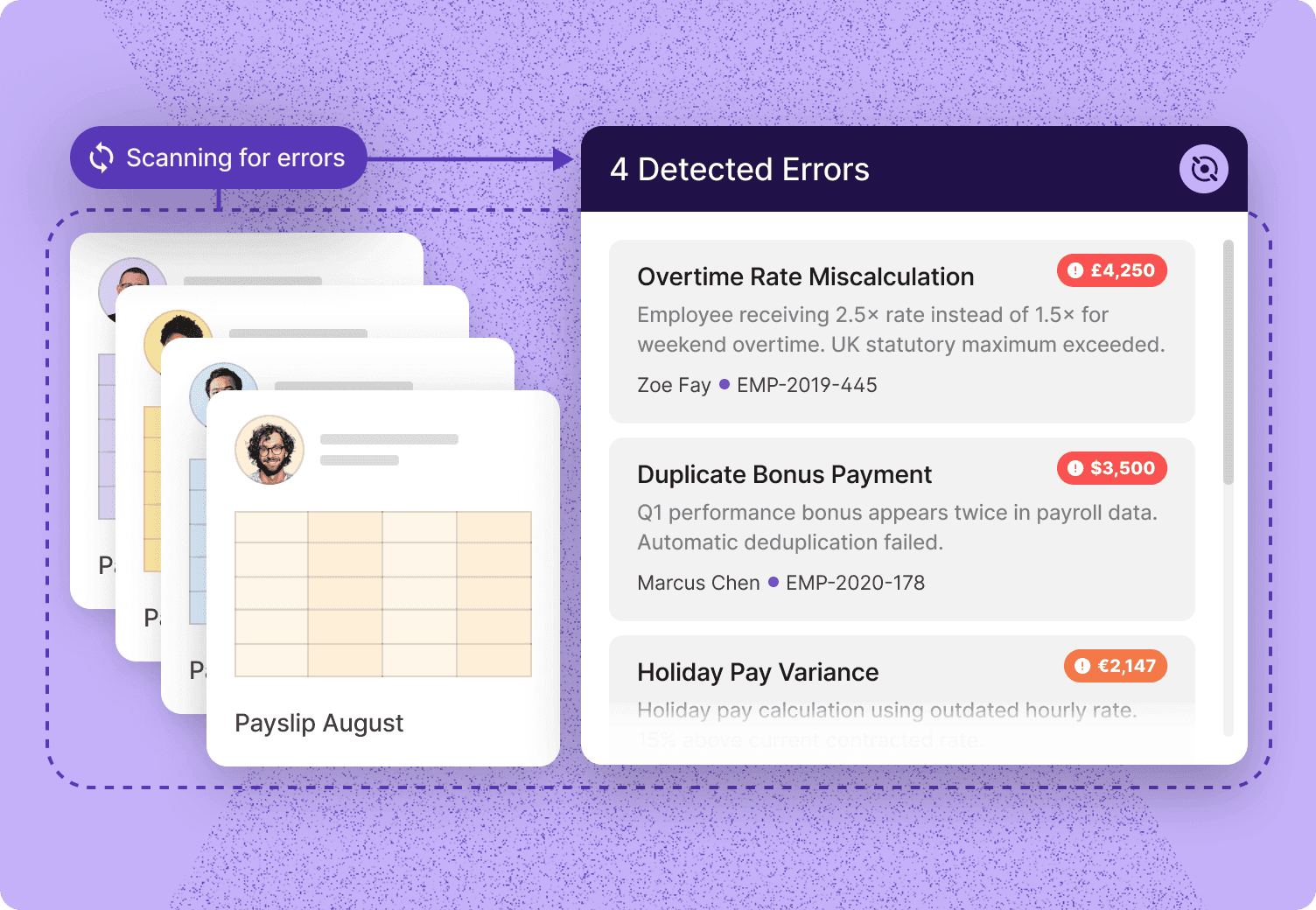
Table of Contents
Why manual payroll review misses errors that automated QA catches
The five error types most likely to slip through before payday
How automated QA logic intercepts errors before the run finalizes
The human-in-the-loop step: where judgment belongs
Why global payroll multiplies every failure mode
What to look for in a payroll QA process
How Deel Payroll applies pre-run validation
Catch payroll errors before they cost you
Key takeaways
Most payroll errors leave data fingerprints before a run closes. The failure is in timing, not complexity.
Automated QA intercepts errors by comparing incoming payroll data against historical per-employee baselines, cross-system records, and peer-cohort norms.
Deel Payroll's AI flags anomalies and unusual changes automatically before a run closes, with human review built into the process.
This article is provided for general informational purposes and should not be treated as legal or HR advice. Refer to your local regulations and consult a qualified professional for specific guidance.
Payroll errors are not random. They follow predictable patterns: a termination entered a day too late, a tax code updated in one system but not another, an overtime rule that stopped applying after a schedule change.
Most organizations only start looking after an employee flags a discrepancy, not because the errors are hard to find, but because no validation step runs before the pay run closes. By then the correction cycle is already underway, and the trust damage is done.
Deel's 2025 Hong Kong Payroll Report found that only 23% of payroll teams describe their function as running smoothly, while 77% grapple with issues that carry consequences for both the business and its employees — including a 40% share of payroll leaders who cite a high risk of errors from manual processes.
On the employee side, Deel's 2025 Singapore Payday Expectations Report found that a third of employees (33%) experienced at least one payroll error in the past 24 months, most commonly a delayed payment. For finance and payroll leaders managing multi-country teams, those numbers represent a compounding risk that grows with every jurisdiction, every system, and every manual data handoff in the process.
This article breaks down the specific error types that slip through manual review most often, explains how automated QA logic catches them before a run finalizes, and clarifies where human judgment still belongs in the loop.
Why manual payroll review misses errors that automated QA catches
Manual review works well when the payroll environment is small, stable, and well-bounded. As headcount grows, jurisdictions multiply, or compensation structures become more complex, the failure modes of manual review become structural rather than incidental.
The core problem is one of timing and scale. A payroll reviewer working through hundreds or thousands of employee records before a deadline cannot simultaneously:
Compare every employee's current-period pay against their own historical baseline
Cross-check HRIS data against time-tracking records against benefits enrollment records
Apply jurisdiction-specific rules for overtime, deductions, and tax withholding consistently across every record
Flag anomalies that only become visible when comparing across peer groups (for example, a department where three employees received a bonus in the same period when no bonus event was scheduled)
63% of companies identify poor system integration as their top operational hurdle, and just 46% use real-time, API-based integration between payroll, HR, and finance systems. The rest still rely on slower batch transfers or manual, hand-keyed data. That integration gap is exactly what automated QA is designed to close: shifting error detection from post-payday employee complaints to pre-run validation.
Deel Payroll
Run payroll in Deel. Anywhere. Your way.
The five error types most likely to slip through before payday
Understanding the specific failure patterns helps clarify why automated detection logic is structured the way it is. Here are the error categories most commonly identified in payroll QA analysis:
Duplicate entries
Duplicate payroll entries can occur when an employee record is processed more than once in a single pay run, typically due to a data migration, an off-cycle correction that was not cleared before the next regular run, or an HRIS sync that fires twice.
They are often small enough in isolation to not trigger manual scrutiny, but they represent a direct overpayment and, in some jurisdictions, a tax reporting obligation that must be corrected.
Automated detection flags duplicate entries by comparing employee identifiers, pay amounts, and pay period references within a tolerance window before the run is finalized.
Misapplied tax rates
Tax rate errors are among the highest-cost payroll mistakes because they compound across every pay period until someone catches them. Just over half of companies (51%) say they are very confident they can ensure payroll compliance across every country where they pay employees — leaving nearly half without full confidence in exactly the kind of jurisdiction-specific tax accuracy this error type depends on.
The underlying cause is usually a data lag: an employee changes their tax elections, relocates to a new jurisdiction, or a legislative rate change takes effect, and one system reflects the update while another does not.
Automated QA catches these by cross-referencing the employee's current configuration against up-to-date jurisdiction tax tables and flagging any cases where the applied rate deviates from the expected rate.
Missing overtime
Overtime errors are both frequent and expensive. Many payroll managers get stuck on repetitive tasks that could be automated, which is exactly the kind of time-and-attendance reconciliation work that lets missed overtime slip through. The failure mode takes three forms: time data not transmitted correctly from the tracking system, an employee's FLSA classification updated in HR but not applied in pay rules, or a schedule change that created an overtime threshold the payroll engine was not configured to catch.
Automated QA approaches this by validating time data against pay rules at the point of payroll calculation, before the run closes, rather than relying on post-run reconciliation.
Benefit deduction mismatches
Benefits enrollment changes (mid-year elections, life events, open enrollment updates) frequently create a timing gap between when the change is recorded in the benefits administration system and when it is reflected in payroll deduction logic. The result is either an over-deduction (the old rate applied after a plan change) or an under-deduction (a new enrollment not yet reflected in payroll).
Incorrect deductions are already one of the most commonly reported payroll errors. These are caught by cross-checking the deduction amounts applied in the current run against the employee's current benefits enrollment record, with any divergence flagged for review.
Off-cycle change conflicts
Off-cycle payroll events (retroactive salary adjustments, severance payments, bonus runs, one-time expense reimbursements) create an elevated risk of collision with the next regular pay run. An off-cycle payment processed but not marked as resolved can appear again in the subsequent run. A retroactive adjustment calculated in isolation can create a net overpayment when combined with the regular cycle. These are among the harder errors to catch manually because the conflict only becomes visible when both events are considered together.
Automated QA detects these by reviewing pending off-cycle items against the current run before finalization, checking for overlap or duplication.
The cost adds up fast
A Forrester Total Economic Impact study commissioned by Deel found that a composite organization using Deel Payroll cut its payroll specialist headcount from 7.5 to 3.45 FTEs per 1,500 employees, saving $2.33 million in benefits against $1.39 million in costs over three years — a 67% ROI. Left uncaught, the kinds of manual errors driving that gap are also the top-cited risk by payroll leaders in Deel's 2025 Hong Kong Payroll Report, where 40% point to manual processes as their biggest source of error risk.
Compliance
Unlock Continuous Compliance™ with Deel
How automated QA logic intercepts errors before the run finalizes
The detection logic in automated payroll QA works by comparing incoming payroll data against multiple reference signals simultaneously. Here's a look at the features carrying most of the weight:
Historical per-employee baselines
Each employee's pay history establishes a baseline that automated systems can use to flag anomalies. If a salaried employee's gross pay deviates significantly from their prior-period pay without a corresponding change event (a raise, a bonus, a leave adjustment), the system flags it for review. This catches a wide range of errors, from incorrectly applied retroactive adjustments to stale data from a system that was not refreshed before the run.
The baseline comparison works in both directions: it catches unexpectedly high pay (potential duplicate or double-application of a bonus) and unexpectedly low pay (a deduction that was entered incorrectly or a salary change that was applied to the wrong record).
Cross-system data validation
Most payroll errors do not originate in the payroll engine. 22% of companies still depend on manual uploads or hand-keyed data to move information between payroll, HR, and finance systems, and 8% have no integration between these systems at all — exactly the kind of fragmented, upstream data architecture that lets errors form before payroll ever calculates a number.
Automated QA addresses this by pulling from multiple source systems before calculation and comparing them for consistency.
A typical cross-system validation checks that:
The employee exists in both HRIS and payroll with consistent status, role, and pay rate
Time data from the time-tracking system matches the hours applied in payroll
Benefits deduction amounts match current enrollment records
Termination dates are reflected consistently across all systems
The system surfaces any cross-system inconsistency as an exception before the run closes, rather than after.
Peer-cohort and schedule-based anomaly detection
Some errors are only visible in context. A single employee receiving an unusually large payment may be explainable, but three employees in the same cost center receiving large payments in the same period with no corresponding approval event is a signal worth examining.
Automated QA uses cohort comparisons to surface these patterns, comparing each employee's pay against a relevant peer group and flagging outliers that fall outside a defined threshold.
This is particularly valuable for detecting bonus duplication, misapplied premium rates, or payroll fraud patterns that would not be visible at the individual employee level.
Detection happens at the data layer
Automated QA does not wait for the payroll engine to calculate before checking for errors. It compares source data from HRIS, time-tracking, and benefits systems against payroll inputs before calculation runs, so discrepancies are surfaced as exceptions rather than baked into the final pay run.
Deel AI
Get global HR insights fast with Deel AI
The human-in-the-loop step: where judgment belongs
A common concern about automated payroll QA is the black-box question: if the system is flagging exceptions and routing them for correction, how much visibility does the payroll team actually have, and who makes the final call?
The value of automated detection depends entirely on what happens after a flag fires. A system that auto-corrects without a human review step is not a QA system but a source of a different kind of error. A well-designed payroll QA workflow structures human judgment into the escalation path rather than treating it as a fallback.
This means:
Flagged exceptions go to a named reviewer, not an automated resolution queue: The payroll manager or designated approver receives a notification with the specific discrepancy, the source data, and the potential impact
Finalization requires explicit approval: The payroll run does not close until the approver has reviewed the flagged items and confirmed the output. This is a structural gate, not an optional check
Multi-level approval is supported for complex organizations: Payroll packages can be routed through multiple approval levels, with each level notified only after the prior level has approved. The final approver confirms before finalization
Employee sentiment backs this up. Two-thirds of employees (67%) are comfortable with AI processing their payroll data, but 45% are concerned specifically about the loss of human oversight.
And when it comes to fixing an actual payroll error, employees are close to evenly split between wanting a human only (49%) or AI paired with human verification (40%).
And it isn't just employees — Deel's AI and the Future of the Workforce report found that 51% of workers are uneasy with AI handling sensitive tasks like payroll more broadly, reinforcing why human review belongs at the point of finalization, not as an afterthought.
Why global payroll multiplies every failure mode
Everything described above becomes more difficult at scale and across jurisdictions. Managing payroll across multiple countries introduces a compounding layer of complexity that manual review processes cannot keep up with:
Tax rates and statutory deduction amounts differ by country and change on varying legislative cycles
Benefit entitlements (leave accruals, pension contributions, health insurance mandates) are jurisdiction-specific and frequently updated
Off-cycle change conflicts multiply when different countries run on different pay calendars
Cross-system data inconsistencies are more likely when HRIS data, time data, and payroll data flow through different regional systems
Payroll compliance requirements vary significantly across geographies, and the penalty exposure for errors in one country may differ substantially from another. A payroll error that triggers a minor correction in one jurisdiction may constitute a reportable compliance failure in another.
Automated QA systems address this by applying jurisdiction-specific rules at the validation layer, so the same underlying logic catches a misapplied tax rate in Germany, a missed overtime threshold in Australia, and a benefit deduction mismatch in Canada, each against the correct local standard rather than a single global rule.
Free guide
Optimize HR with AI
What to look for in a payroll QA process
Whether evaluating a current system or a new provider, the following characteristics indicate a payroll QA process that operates at the validation layer rather than after the fact:
| Characteristic | What to look for |
|---|---|
| Pre-run validation | The system surfaces errors before finalization, not after the run closes |
| Cross-system data checks | The system compares HRIS, time-tracking, and benefits data against payroll data before calculation |
| Exception routing | Flagged items are assigned to a named reviewer, not auto-resolved |
| Multi-level approval | Payroll packages require explicit sign-off before closing |
| Jurisdiction-specific rules | Validation logic applies local tax and compliance rules per country |
| Audit trail | Every exception, review action, and approval is logged and accessible |
The absence of any of these characteristics is a signal that the process relies on manual review or post-run correction, both of which are structurally less reliable as payroll scale and complexity increase.
Deel Payroll: pre-run validation built in
Deel Payroll integrates automated validation before any payroll package finalizes. The system checks payroll components against Deel's native payroll engine, surfaces anomalies like duplicates and unusual changes via AI-driven checks, with human review before the run closes.
Supports global teams with in-house payroll infrastructure
Deel's HRIS connects headcount data directly to payroll
AI-flagged anomalies reviewed before every run closes
Local experts maintain jurisdiction-specific compliance knowledge
How Deel Payroll applies pre-run validation
AI catches anomalies before every run
Deel Payroll integrates automated validation as a pre-run step, before any payroll package is finalized. AI checks flag duplicates and unusual changes in payroll data, supporting the Payroll Manager's review rather than replacing it. A person reviews anything flagged before the run closes.
Organizations using Deel Payroll saved payroll specialists 60% of the time they previously spent processing payroll and fixing inaccuracies. That contributed to a 67% ROI and $936,000 in net present value over three years.
Connected HR data, no manual syncing
For teams running payroll across regions, the upstream data problem is particularly important to address. Deel HR connects headcount and compensation data directly to payroll without requiring a third-party sync. When a salary changes, HR records a termination, or an employee updates their benefits election, that change flows natively into payroll.
Reduces the manual data handoffs where inconsistencies typically develop
For organizations using external HRIS platforms, Deel also integrates with Workday for time and attendance data
Local expertise across countries
Deel Payroll supports global teams with in-house payroll infrastructure and local experts who maintain jurisdiction-specific compliance knowledge. This means the same pre-run validation layer applies local tax rules, statutory requirements, and compliance standards for each country in a single pay run. Payroll teams don't need to track legislative changes across dozens of jurisdictions independently.
Catch payroll errors before they cost you
Payroll errors are, in most cases, preventable. The data fingerprints exist before the run closes. Whether a validation system looks for them before or after payday is what determines the cost.
For payroll and finance leaders managing growing or distributed teams, shifting from post-payday correction to pre-run detection moves risk control upstream. Deel Payroll's pre-run validation and AI-driven anomaly detection give payroll teams the visibility they need to catch discrepancies before they become employee complaints, compliance flags, or correction cycles.
Book a demo to see how it works in practice.
Live Demo
Get a live walkthrough of the Deel platform
FAQs
What is automated payroll QA?
Automated payroll QA is a pre-run validation process that compares incoming payroll data against multiple reference signals, including historical baselines, cross-system records, and jurisdiction-specific rules, to surface anomalies and discrepancies before a pay run is finalized.
What types of payroll errors does automated QA catch?
Automated QA is most effective at detecting duplicate entries, misapplied tax rates, missing or incorrect overtime, benefit deduction mismatches, and off-cycle change conflicts, all error types that leave consistent data fingerprints before the run closes.
Does automated payroll QA replace human review?
No. Automated QA detects and flags exceptions. Human reviewers and approvers make the final call. Well-designed systems route flagged exceptions to a named reviewer and require explicit approval before finalization, keeping human judgment structurally in the loop.
How does global payroll increase the complexity of error detection?
Multi-country payroll introduces jurisdiction-specific tax rates, benefit rules, pay calendars, and compliance requirements that vary by country and change frequently. Automated QA addresses this by applying local rules at the validation layer, so the same process catches errors across different jurisdictions against the correct local standard.
Shannon Ongaro is a content marketing manager and trained journalist with over a decade of experience producing content that supports franchisees, small businesses, and global enterprises. Over the years, she’s covered topics such as payroll, HR tech, workplace culture, and more. At Deel, Shannon specializes in thought leadership and global payroll content.