Article
5 min read
Geofencing for Time Tracking: How Location Clock-Ins Work
Global HR
Global payroll

Author
Shannon Ongaro
Last Update
June 29, 2026

Table of Contents
What is geofencing for time tracking?
Who benefits from a geofence time clock?
How geofencing in time tracking works
How Deel’s Time Tracking handles location data
Geofencing vs. continuous location tracking: What's the difference?
How to set up geofencing in Deel
Learn more about Deel’s Time Tracking feature
Key takeaways
Geofencing time tracking validates a worker's clock-in against an approved work location, so time records reflect where work happened.
Geofence time clocks are most common in field service, retail, construction, and logistics teams.
Deel’s Time Tracking feature includes geofencing capabilities that capture location data only at clock-in, break times, and clock-out, and is only used for attendance verification.
Time records only help when they reflect what actually happened, and for site-based teams, they often don't. Buddy punching, clock-ins from the parking lot, and off-site punches all put paid hours out of step with real attendance, and the gap usually lands on a manager to catch and fix by hand.
Geofencing helps close that gap by validating each clock-in against an approved work location. A worker can punch in or out only when they're physically inside a defined radius, so the time record carries a clear confirmation of where the shift started and ended, with no manual sign-off on every entry. Deel builds geofencing into its Time Tracking, so verified hours flow straight into approved timesheets and payroll.
This article covers what geofencing for time tracking is, how clock-in validation works at the moment of the punch, who relies on it most, and how Deel verifies attendance without continuous monitoring.
What is geofencing for time tracking?
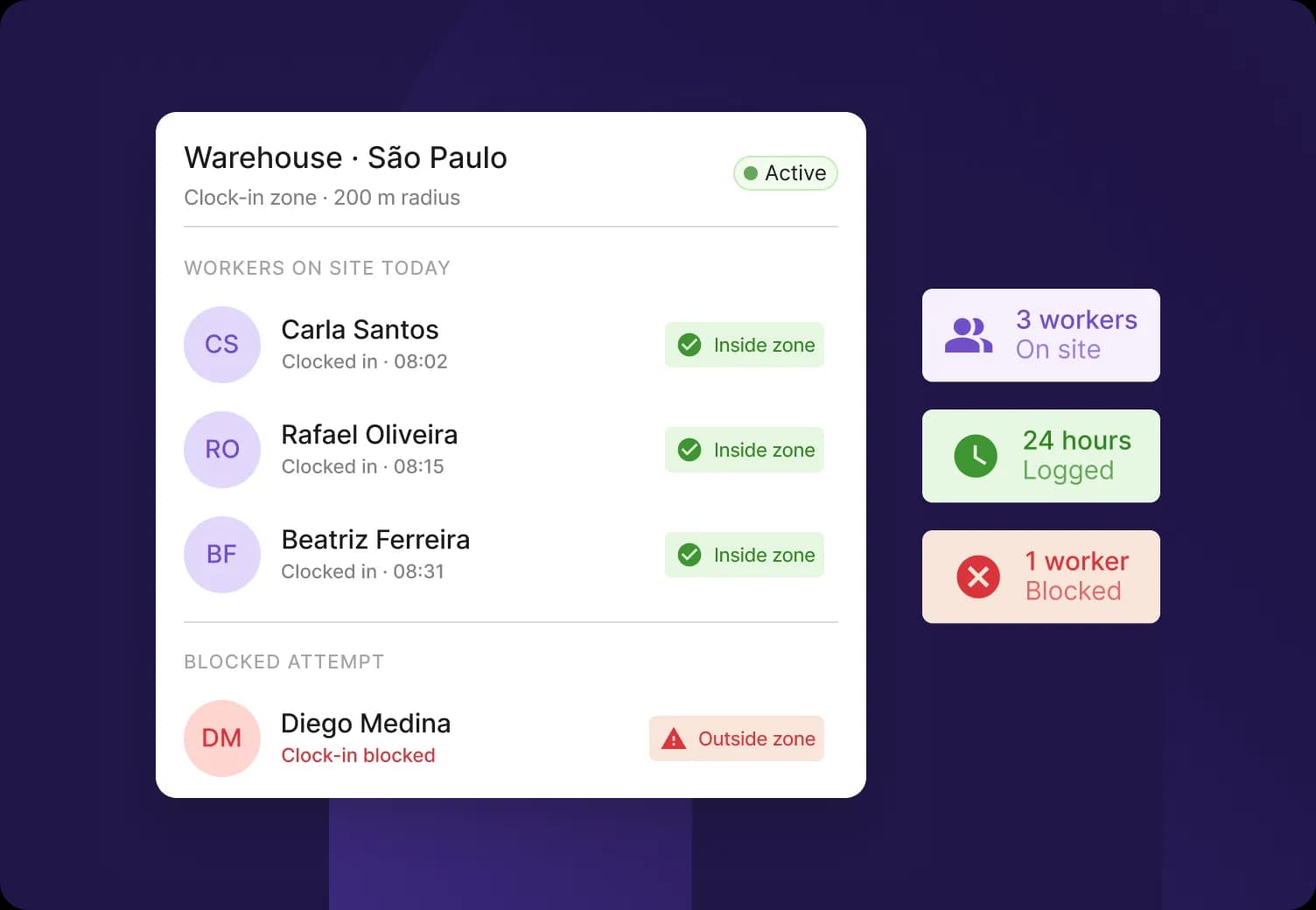
Geofencing is a method of validating work hours against location boundaries. An employer defines a radius around an approved work location, and a worker can clock in or out only when they're physically within that zone. It verifies attendance at the moment of the punch rather than monitoring the location continuously.
A geofence is a virtual boundary around a physical work location, set using a location center and a radius. It confirms whether the worker is inside or outside the boundary at the moment of the punch, and it does not record a trail of movements. That check happens at clock-in, break times, and clock-out, not across the whole shift.
Deel's geofencing lets admins define approved work locations and a radius, then validates that workers clock in and out from within that boundary using the Deel mobile app. A worker's time record then carries a clear confirmation that they were physically at the right place when the shift started and ended. The only data stored is whether the employee was inside a geofence or not, and which client work location it was.
Deel HR
One place for simplified, smarter global HR
Who benefits from a geofence time clock?
Geofence time clocks deliver the most value to teams where work happens at a fixed physical location rather than at a desk. Four sectors see it consistently:
Field service teams
Field service teams use geofencing to confirm a worker was on-site without manual sign-off. Workers visit client sites, facilities, and installations throughout the day, and validating each clock-in against the assigned work location records attendance automatically. This removes the supervisor approval step that field operations usually depend on.
Retail and hospitality
Retail and hospitality teams use geofencing to keep paid hours tied to actual on-site time. Shift workers clock in at stores, restaurants, and venues where start times are precise, and validating the punch against the work location prevents an early clock-in from the parking lot or a nearby spot. The recorded hours match the hours worked.
Construction sites
Construction teams use geofencing to tie time records to specific job sites, which impacts billing and compliance. Large or rotating sites have multiple crews moving between locations, and validation against the correct work location keeps each crew's hours attached to the right site. This accuracy supports project billing and prevailing-wage requirements.
Logistics and delivery operations
Logistics teams use geofencing to confirm workers are at the correct facility when a shift begins. Depot clock-ins and warehouse attendance depend on physical presence, and validating the punch against the facility location keeps attendance records accurate across shifts and sites.
Field Services
Deploy onsite workers compliantly in days

How geofencing in time tracking works
Geofencing in time tracking works by defining a boundary around an approved work location and using the worker's mobile device to validate their location when they clock in or out. A punch inside the radius is recorded, and a punch outside it is either blocked or accepted with a warning to the approver, depending on how the admin configured the policy.
With Deel, the setup and daily flow run in seven steps:
Create the work location in the entity's address settings.
Define the radius from the location center within which a worker can clock in.
Enable geofencing inside a time tracking policy, which requires the clock-in/clock-out method and disables async submission automatically.
Assign workers to the policy so the geofenced rule applies to them.
Have the worker clock in on the Deel mobile app, which checks the device location against the assigned boundary at the moment of the punch.
Record the validated punch inside the radius, or block it (or flag it to the approver) when it falls outside.
Send approved hours into timesheets and payroll, closing the loop between verified work and accurate pay.
How Deel’s Time Tracking handles location data
Deel captures location data only at clock-in, break times, and clock-out, and stores only whether the worker was inside the geofenced zone. The design has four concrete parts:
Capture: Location is read-only at the moment of clock-in, break times, and clock-out
Storage: Deel keeps whether the worker was inside the geofenced zone and which client work location it was, not a continuous coordinate trail
Retention: Geolocation data is deleted automatically after 90 days, or within the retention window you configure
Transparency: Workers can view their full location history in the Deel app at any time, and the team is notified when geofencing is enabled
Some time tracking tools maintain a continuous location stream throughout a shift, which creates a sensitive dataset to protect, retain, and potentially disclose. Deel's geofencing is event-based. It validates clock-ins and clock-outs against approved work locations rather than tracking the location continuously.
Live Demo
Get a live walkthrough of the Deel platform
Geofencing vs. continuous location tracking: What's the difference?
Geofencing and continuous location tracking both use location data, but they capture different information and carry different implications for worker privacy:
| Feature | Geofencing | Continuous location tracking |
|---|---|---|
| Purpose | Attendance verification — validates clock-ins and clock-outs against approved work locations | Continuous worker monitoring |
| When location is captured | Only at clock-in, break times, and clock-out | Throughout the entire shift |
| What gets recorded | Whether the worker was inside or outside the geofenced zone and which work location it was | Continuous location history and movement trails |
| Data stored | Inside-zone result and work location only | Complete location coordinates and path data |
Deel's approach is event-based attendance verification. The platform validates that a worker was at an approved location when they punched in and out, and it does not run continuous location tracking of any kind, which is why the privacy footprint stays small.
How to set up geofencing in Deel
Geofencing is configured inside a time tracking policy in Deel, so on-site teams and remote workers can run on different clock-in rules within the same account. An HR or operations admin can set it up without engineering support:
Start by configuring your work locations in the entity's address settings.
Create or edit a time tracking policy and select the clock-in/clock-out submission method, which geofencing requires, and disables async submission automatically.
Select which work locations to geofence, set the radius for each, and decide whether off-site punches are blocked or allowed with a warning to approvers.
Assign workers to the policy to apply the rule.
Geofencing applies per policy and per location, so you don't have to apply it everywhere. Remote and hybrid teams can stay on standard time tracking while on-site crews run geofenced clock-ins, all within the same Deel account.
Learn more about Deel’s Time Tracking feature
Geofencing fits into how Deel's time tracking serves teams whose work happens on-site.
Validated clock-ins feed into timesheets and payroll with verified location confirmation, and field services teams get location-verified attendance records. For other worker types, time data connects into the same approval-to-payroll workflow, with availability varying by product and worker type.
To see how time tracking connects across payroll and worker types, explore Deel's Time Tracking page, or book a demo to see it in your workflow.
FAQs
What is geofencing in time tracking?
Geofencing in time tracking uses a virtual boundary around an approved work location to validate attendance. Workers can clock in and out only when they're physically within a defined radius of that location, verifying attendance at the moment of the punch and not monitoring the location continuously.
How accurate is a geofence time clock?
Accuracy depends on the radius the admin sets and the device's location signal. Larger sites such as warehouses and construction zones typically use a wider radius, while tighter radii suit dense urban locations with a strong signal.
Can workers clock in from anywhere if geofencing is enabled?
No. When geofencing is enabled for a work location, the tracker validates the worker's location at clock-in and clock-out. A punch outside the geofenced zone is either blocked or allowed with a warning to the approver, depending on how the admin configured the policy.
Does Deel track employee location continuously during a shift?
No. Deel captures location only at clock-in, break times, and clock-out, and stores only whether the worker was inside the geofenced zone and which work location it was. There's no continuous monitoring between punches, and geolocation data is deleted after 90 days or within your configured retention window.
Is there an additional fee for Deel’s geofencing and time tracking capabilities?
No. Deel’s geofencing and time tracking features are bundled into the existing contract pricing and is not sold or billed as a standalone add-on.
Is geofencing time tracking legal?
Geofencing legality varies by jurisdiction. In most countries, employee geofencing for time tracking is legal when implemented under the correct regulatory requirements. Employers should always verify local regulatory requirements before implementing employee geofencing.
Disclaimer: This content is for informational purposes only and does not constitute legal or tax advice. Regulations vary by jurisdiction and change frequently. Consult qualified legal or tax professionals for advice specific to your situation.
Shannon Ongaro is a content marketing manager and trained journalist with over a decade of experience producing content that supports franchisees, small businesses, and global enterprises. Over the years, she’s covered topics such as payroll, HR tech, workplace culture, and more. At Deel, Shannon specializes in thought leadership and global payroll content.