Article
18 min read
12 Performance Reviews You Can Automate — and When to Run Each One
Global HR

Author
Lorelei Trisca
Last Update
June 02, 2026

Table of Contents
1. Annual performance reviews
2. Mid-year or biannual reviews
3. Peer reviews
4. Managerial reviews (upward feedback)
5. Self-evaluations
6. 360-degree reviews
7. Goal-based reviews
8. Competency-based reviews
9. 9-box assessments
10. Job leveling reviews
11. Probation or onboarding reviews
12. Development or growth reviews
Running all 12 manually isn't realistic — here's what changes when you automate
Tips to get the most out of your reviews
Run your first automated review cycle with Engage
Key takeaways
Many HR specialists (including Deel’s own People team) view the traditional annual performance review as stale and outdated. A better approach is to tailor performance evaluations to each distinct stage of the employee journey, such as onboarding, development, promotions, and project work.
Effective performance management blends quantitative ratings with qualitative insight, giving teams the measurable data and real-world context needed to make fair, informed decisions.
Running multiple types of performance reviews manually isn't realistic. But automation can help make the process seamless, and power employee growth without adding admin for HR teams.
Picture this: your startup just hit 100+ people, and performance reviews are anything but smooth. Your engineering team runs their performance review using a previous manager’s Google Sheet, but Sales and Product use a completely different version. You spend hours trying to standardize templates and performance rating scales, only to end up in calibration with a mess of PDFs and manager notes to work from.
When annual review season finally wraps, new challenges immediately land on your plate: probation reviews for new hires, level-progression assessments for emerging leaders, and project-based evaluations for cross-functional teams.
This illustrative example is the reality for organizations worldwide. No surprise, then, that only 32% of executives in 2025 said their performance management approach enables timely, high-quality talent decisions about high and low performers, according to Deloitte.
The fix isn't running more reviews. It's knowing which type fits each moment, and automating the ones that should run themselves. This guide covers all 12 performance review types, when to use each one, and what becomes possible when you stop building them by hand.
1. Annual performance reviews
Best for: Organizations seeking structured goal-setting and reflection
Annual performance reviews help you take stock of an employee’s performance over the past year, including what they achieved or missed, and what development opportunities should shape the year ahead. This type of review is most effective when it combines data, reflection, and forward-looking planning.
Common elements of an annual performance review include:
Quantitative ratings to evaluate goals, competencies, or role expectations
Qualitative questions that identify nuance, context, and real examples of impact
Manager evaluations that reflect performance, growth potential, and areas to improve
Peer or cross-functional input for employees whose work spans multiple teams
Calibration sessions to promote fairness and consistency across departments
Goal-setting for the next cycle, often tied to OKRs or role expectations.
Sample questions for an annual performance review
Here are a few examples of qualitative and quantitative questions you can borrow for your review.
On a scale of 1-5, how has the employee contributed to reaching the current company goals?
How effectively does the employee align their goals with the organization’s objectives?
On a scale of 1-5, how would you rate the employee’s demonstration of their core competencies in their role?
What can the employee do differently in the future to avoid repeating mistakes?
Want more examples? Explore the full list of questions in our detailed performance review questions guide.
How to automate this review
Annual reviews are one of the highest-value cycles to automate. A modern performance platform lets you:
Launch structured reviews with clearly defined stages — feedback writing, calibration, and sharing — triggered automatically by your review calendar
Set automated reminders so reviewers never miss a deadline without manual chasing
Funnel all feedback into a single dashboard, eliminating the spreadsheet chaos
When this runs automatically, HR shifts from managing logistics to acting on insights.
Deel HR
Unlock your team's full potential
2. Mid-year or biannual reviews
Best for: Companies focused on agility and continuous improvement
Mid-year or biannual reviews offer a great middle ground, giving teams a chance to recalibrate between annual cycles. They’re designed to help managers identify if the employee is on track or if they could benefit from some additional support or resources. Typically, these reviews include:
Shorter check-in forms focused on progress rather than a full-scale evaluation
Updates on goal status (met, in progress, blocked, or re-scoped)
Brief manager comments to reinforce strengths or highlight areas requiring attention
Self-reflections on obstacles, priorities, and next steps
Adjustments to goals or expectations to reflect any changing business needs (for example, after a new product launch or team reshuffle)
Lightweight calibration to maintain consistency without the overhead of annual cycles
Sample questions for a mid-year performance review
Anchor your questions to the annual review a few months before, such as:
How well has the employee progressed towards their goals set at the beginning of the year?
Can you provide an example of how the employee effectively managed a shift in priorities?
How would you assess the employee’s time management skills and their impact on overall productivity?
What areas does the employee need to improve for the remainder of the year?

Free template
Turn mid-year check-ins into year-end wins
How to automate this review
Mid-year check-ins are easy to deprioritize when things get busy. Automation ensures they happen regardless. The most efficient approach:
Clone your annual review survey and adjust to a shorter format
Schedule it to trigger automatically at a set point in the year (or 6 months post-hire)
Use automated reminders to keep completion rates high without extra admin overhead
It’s a simple, streamlined way to keep performance conversations ongoing, while providing managers and employees with a clear view of progress year-round.
3. Peer reviews
Best for: Organizations emphasizing teamwork and shared accountability
Peer reviews collect horizontal feedback from their colleagues to strengthen collaboration across the team. A peer-review process typically looks like this:
HR decides how many peers should be involved, who qualifies as a peer (e.g., same team, cross-functional collaborators), and who’s responsible for choosing and approving them.
Peers are nominated to review specific colleagues (either by the employee or their manager). The nominees should be familiar with their work and be able to articulate their collaboration, reliability, and impact on shared outcomes.
Managers or HR approve nominations based on the policy. The aim is coverage and balance, so the reviewers shouldn’t all be close friends or from a single function.
Peers complete structured review forms by rating and commenting on areas like teamwork, communication, dependability, problem-solving, and contribution to group goals.
Peer input is combined with manager and self-assessments to inform reviews, development plans, and coaching conversations.
Sample questions for a peer review
On a scale of 1 to 10, how effectively does your coworker communicate within the team?
How often does your coworker meet project deadlines? (1 = Never, 5 = Always)
On a scale of 1 to 10, how well does the employee handle and adapt to change?
How well does the employee demonstrate collaboration across teams on a scale of 1 to 5?
Create your own perfect peer review with these sample questions.
How to automate this review
Peer reviews involve the most moving parts of any review type, including nominations, approvals, and reminders across multiple participants. Automation makes them manageable at scale:
Set nomination rules once (number of peers, approval flow, anonymity settings)
Auto-trigger invitations and reminders for each reviewer group
Aggregate results automatically so HR isn't manually compiling feedback from dozens of forms
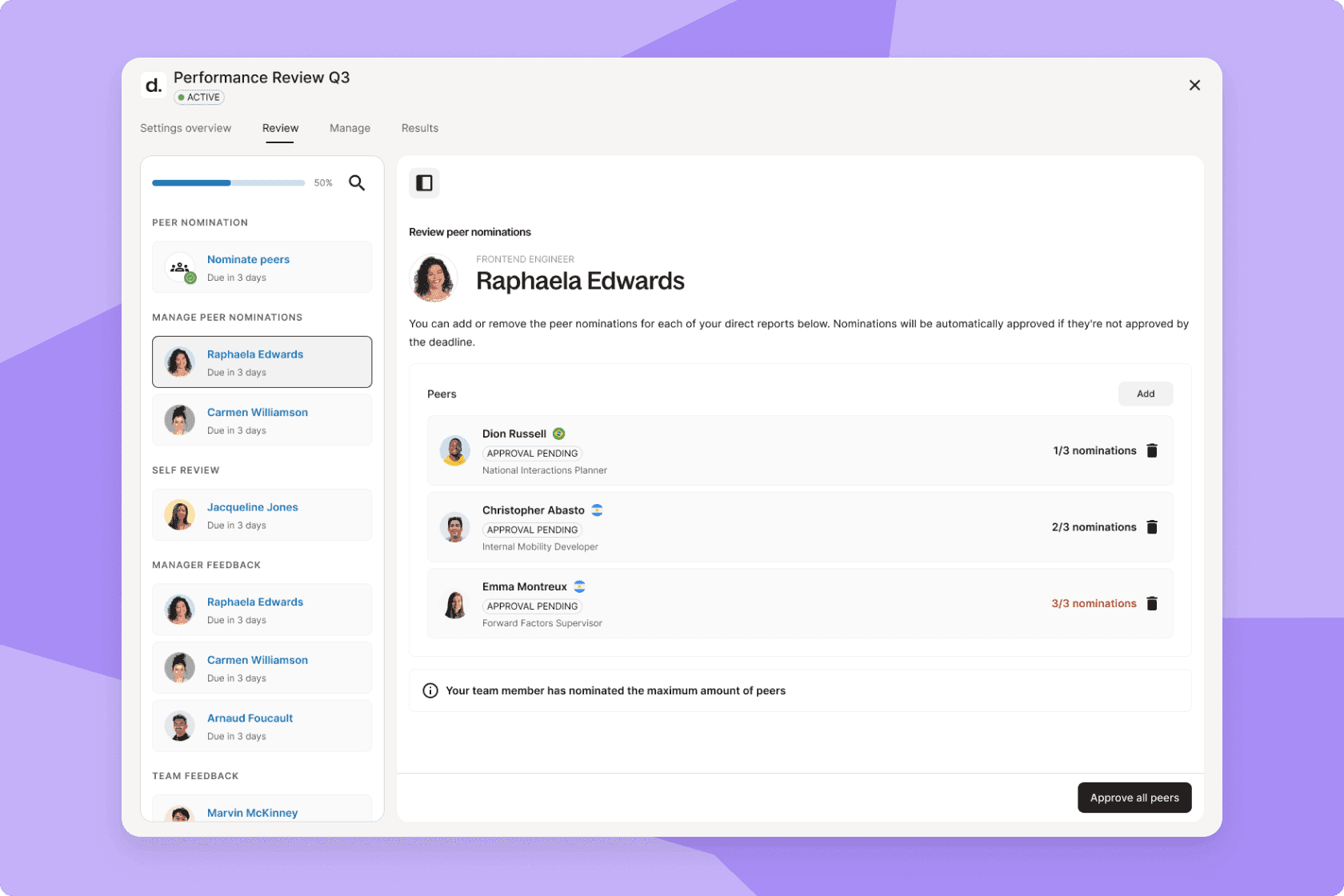
Peer nomination phase in Engage, Deel HR's talent management module
4. Managerial reviews (upward feedback)
Best for: Companies prioritizing leadership development and cultural alignment
Where traditional performance feedback flows from manager to direct report, a managerial review turns the tables, using upward feedback. This type of review provides employees with a safe and structured way to share their thoughts on how effectively their managers lead, communicate, and support their growth.
Managerial reviews typically include:
Anonymous upward-feedback surveys completed by direct reports who feel safe to speak up without fear of reprisal
Clear criteria tied to leadership behaviors, communication, coaching, and decision-making
Ratings and qualitative comments that reveal how managers influence team morale and performance
Questions focused on support, clarity, fairness, and people-management skills
Optional visibility rules to protect employees and maintain trust
Aggregated insights for leadership development, manager training, or calibration discussions
Sample questions for a manager review
How clear and understandable are the instructions and information provided by your manager?
The manager consistently shows consideration for me as a person. (Scale: 1-5, where 1 = Strongly disagree and 5 = Strongly agree)
How does your manager resolve conflicts within the team?
The manager has had meaningful discussions with me about my career development in the past six months. (Scale: 1-5, where 1 = Strongly disagree and 5 = Strongly agree)
For more upward feedback questions, check out 53+ qualitative and quantitative examples for inspiration.
How to automate this review
Upward feedback is most effective when it runs on a predictable cadence, not just when someone decides to schedule it. Automation enables:
Confidential feedback forms that trigger on a set schedule or after manager milestone events
Customizable visibility settings so employees feel safe sharing candid insights
Responses that roll automatically into reporting dashboards, with no manual aggregation
Leaders drive our organization. With Engage, we’ve introduced innovative learning tools to enhance their effectiveness and success. As a result, 100% of our managers feel supported in their growth.
—Daniel Sobhani,
CEO, Freeletics
5. Self-evaluations
Best for: All employees, especially in feedback-driven cultures
Managers can’t see everything. Sometimes, the best way to bring something to light in a performance setting is to ask reviewees to evaluate their own performance, providing context that might otherwise be invisible. This exercise also encourages the direct report to reflect on their performance and take ownership of their growth journey.
Self-evaluations typically include:
Reflection prompts on achievements, challenges, and recent outcomes
Ratings that help employees evaluate their own performance objectively
Space to describe strengths, wins, and personal contributions
Honest discussion of improvement areas and growth opportunities
Values-based reflection to assess cultural alignment
Future-oriented goal-setting or commitments for the next cycle
Samples of self-evaluation feedback
Here are some examples highlighting strengths:
“I have consistently improved my coding skills by taking online courses and in-house training from senior colleagues. I’ve mastered React and will move on to backend languages in the coming period.”
“I have been successful in achieving a 95% customer satisfaction rating, surpassing the company target of 90%. This was accomplished by implementing a proactive approach to customer service and timely resolution of issues.”
The following examples cover potential improvement areas:
“While I have made progress in most KPI areas, I fell short of the target for reducing customer churn by 5%. I will be focusing on improving customer retention strategies and working with my team to find innovative solutions to this challenge.”
“I tend to delve deep into details, which is valuable for quality but can at times slow down my productivity. I am working on discerning when to employ a broader overview versus a detailed analysis.”
Creating your self-evaluation feedback is a skill you can hone. Take inspiration from these self-evaluation examples as you practice.
How to automate this review
Self-evaluations are straightforward to automate, and they should launch automatically as part of any broader review cycle:
Trigger self-evaluation forms at the same time as manager or peer review launches
Responses flow into a centralized dashboard alongside manager feedback, making gaps and alignments instantly visible
No manual chasing, with automated reminders handling completion follow-up
Free template
Simplify self evaluations
6. 360-degree reviews
Best for: Leadership development, performance calibration, and culture building
Instead of relying on a single source of input to evaluate performance, a 360-degree system collects holistic feedback from multiple sources, such as peers, managers, and direct reports, for a more well-rounded overview. Companies like Netflix have famously scrapped the traditional downward feedback via the annual review, opting instead for a 360-degree performance appraisal.
360-degree reviews typically include:
Multi-rater surveys capturing feedback from managers, peers, direct reports, and self-evaluations
A mix of ratings and open-ended questions for well-rounded insights
Role-based question sets tailored to each reviewer group
Anonymity for upward and peer feedback
Aggregated reports showing trends across rater groups
Cross-functional insights that support leadership development and performance calibration
Sample questions for a 360-degree review
Manager: Rate the employee’s ability to meet deadlines on a scale of 1-5, where 1 means rarely meets deadlines and 5 means always meets deadlines.
Self: Rate your efficiency in pitching solutions on a scale of 1-5, where 1 means rarely efficient and 5 means always efficient.
Manager: Describe a situation where the employee went above and beyond their job requirements. What specific actions did they take?
Self: Rate your ability to communicate clearly with clients and third parties on a scale of 1-5, where 1 means poor and 5 means excellent.
Explore more 360-degree questions and examples of the 360-degree feedback provided to support growth.
How to automate this review
360-degree reviews are the most complex to coordinate manually, and automation is what makes them scalable:
Define reviewer groups (self, peer, manager, direct report) and selection rules once
Set anonymity levels per reviewer group
Automate invitations and reminders for each participant group independently
Pull results into a summary view automatically, no manual aggregation required
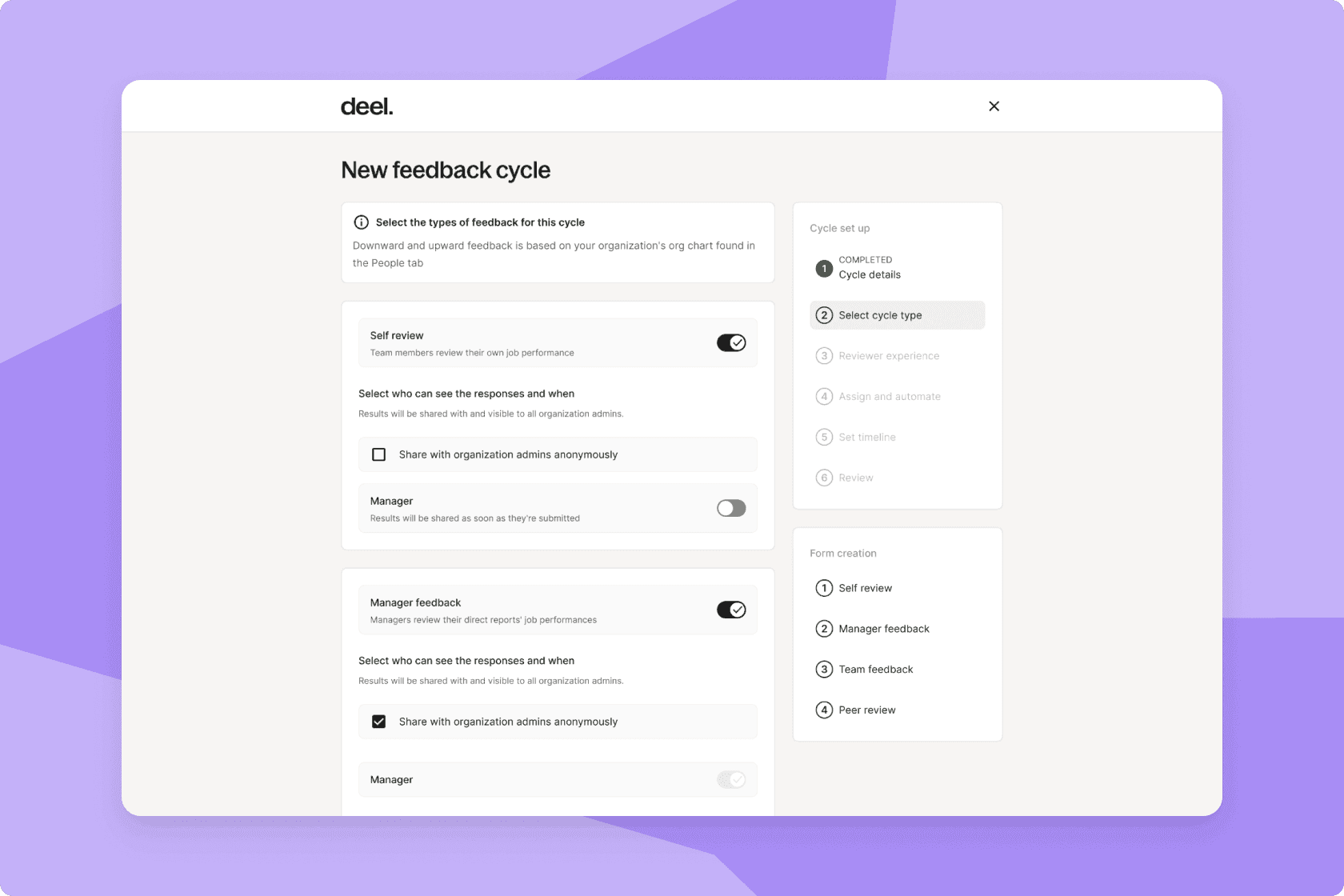
Launch 360 feedback cycle: Include manager, upward, peer feedback and self-evaluations
7. Goal-based reviews
Best for: Cross-functional or project-driven teams
Goal-based reviews evaluate an employee’s performance against specific targets, deliverables, or project outcomes. Instead of assessing broad competencies or long-term behaviors, this type of review focuses on specific achievements and their impact on team or business priorities.
Goal-based reviews typically include:
Goal-completion metrics that show progress, blockers, or re-scoped objectives
Milestone commentary detailing wins, setbacks, and adjustments along the way
Reflection questions about decision-making, impact, and collaboration
Assessment of outcome quality along with the output itself
Next steps or new priorities for the upcoming cycle
Sample questions for a goal-based review
Manager: What were the most significant contributors to hitting or missing key milestones?
Manager: On a scale of 1-5, how would you rate the employee’s collaboration and communication with cross-functional partners during this project?
Manager: What impact did the employee’s work have on team, customer, or business outcomes?
Manager: What lessons from this project should carry forward into future cycles?
How to automate this review
Goal-based reviews are most powerful when they're directly linked to the goals themselves:
Tie review criteria directly to OKRs and individual objectives set earlier in the cycle
Auto-populate goal status (on track, blocked, complete) into review forms
Filter results by project, team, or contributor automatically
Engage transformed how we approach performance. We could finally translate high-level company OKRs into clear, individual goals, giving our teams the clarity they needed to succeed.
—Shawnda Kohr,
HRBP of Beatgrid Media
8. Competency-based reviews
Best for: Organizations with defined competency or skills frameworks
Instead of focusing solely on output or goals, competency reviews assess the underlying capabilities, skills, and behaviors that drive performance, such as communication, problem-solving, leadership, collaboration, or technical expertise.
It’s especially useful in organizations with clear leveling guides, role expectations, or defined career pathways. Competency-based reviews typically include:
Ratings for each core competency are tied to requirements for the employee’s role or level
Qualitative comments that provide examples of strengths and areas to improve
Competency categories, such as communication, teamwork, problem-solving, or leadership
Behavior-based indicators that make expectations clear and consistent
Insights used for development planning, promotions, and coaching
Sample questions for competency-based reviews
Self: How have you demonstrated your ability to think critically and strategically in your role? Please provide a specific example.
Manager: Can you provide an example of when the employee had to manage competing priorities and how they ensured the timely completion of tasks?
Self: How effectively have you applied your technical skills to meet your job responsibilities? Please provide an example.
Manager: Can you share an instance where the employee had to provide constructive feedback to a coworker? How did they approach this situation, and what was the outcome?
Explore more examples of competency-based performance appraisal questions and frameworks in our full guide.

Free template
Unlock employee potential with competency-based performance reviews
How to automate this review
Competency reviews require a lot of setup, but once the framework exists, the review itself should be largely automated:
Define a competency library for all roles and levels (AI can accelerate content creation here)
Link competencies to feedback surveys automatically — context appears inline for reviewers
Generate 360-degree input across rater groups without manual coordination
Career Management
Professional growth with AI-powered precision

9. 9-box assessments
Best for: Leadership teams and HR functions focused on strategic workforce planning
9-box assessments evaluate an employee’s current performance alongside their future potential, giving organizations a simple but powerful way to identify top talent, rising stars, and development needs.
9-box assessments typically include:
A 3×3 grid mapping employees by performance (low-high) and potential (low-high)
Manager input on readiness for expanded responsibilities or higher-level roles
Behavior- and results-based performance insights from recent review cycles
Discussions around leadership qualities, growth trajectory, and long-term fit
Calibration meetings to encourage consistency across teams or departments
Follow-up development planning based on where employees land in the grid
Sample questions for a 9-box assessment
Does the employee demonstrate strong leadership potential? How well have they taken initiative or led projects?
Does the employee consistently demonstrate a commitment to the company’s core values and culture?
How well is the employee performing in their current role? Are they meeting, exceeding, or falling short of expectations?
How proficient is the employee in both technical skills and soft skills (communication, teamwork, adaptability)?
How to automate this review
The 9-box grid is only as useful as the data going into it. Automation ensures that data is consistent and current:
Pull performance and potential inputs directly from completed review cycles, no manual data entry
Generate the 9-box grid automatically from single- or multi-rater review results
Surface high performers and succession candidates without manual analysis
10. Job leveling reviews
Best for: Organizations with structured job families or career frameworks
Job leveling reviews check if an employee is ready to move into a higher role, or whether their current role is still the right level. This review type is only possible with a clearly defined job architecture. It’s an approach that’s vital for establishing a fair promotion and career progression process.
Job leveling reviews typically:
Compare the employee’s current role responsibilities to the expectations of the next level
Evaluate demonstrated competencies, behaviors, and measurable outputs aligned to job-family standards
Assess decision-making authority, scope of influence, and impact on the organization
Identify performance gaps relative to role expectations and next-level readiness
Articulate any missing criteria or skills required for promotion
Document the agreed next steps or development plan for leveling
Sample questions for job leveling reviews
On a scale of 1-5, how well does the employee perform the core responsibilities of their current level?
Which promotion criteria are already met, and which are still missing?
On a scale of 1-5, how proficient is the employee in the competencies required for the next level (e.g., communication, influence, technical depth)?
What evidence is there that the employee is ready for broader responsibilities or a higher-scope role?
How to automate this review
Job leveling reviews are high-stakes, and consistency matters. Automation removes subjectivity from the process:
Link reviews directly to role- and level-based criteria set in your job architecture
Ensure every manager evaluates against the same standards, with no freeform scoring
Surface readiness gaps and development opportunities in consolidated dashboards automatically
11. Probation or onboarding reviews
Best for: Scaling organizations hiring frequently
Probation and onboarding reviews help you understand how well new hires are adjusting, performing, and integrating into your culture, long before the annual review cycle.
These short, structured check-ins provide new employees with the support they need, and give managers an early signal of whether resources or role clarity need adjustment. They’re especially valuable for fast-growing companies where dozens of employees may be onboarding at the same time.
Probation or onboarding reviews typically include:
30-, 60-, and 90-day check-ins to track early performance and ramp-up progress
Short surveys for new hires, managers, and (optional) peers
Ratings on goal clarity, training quality, and alignment to role expectations
Qualitative reflections on challenges, wins, and culture fit
Early identification of performance or onboarding gaps
Follow-up action items or development support for a successful ramp-up
Sample questions for probation or onboarding reviews
Probation: What were some challenges you experienced during your probationary period?
Probation: How do you see yourself developing in this role/organization in the next six months? 12 months?
Onboarding: On a scale of 1 to 5, where 1 means “not at all clear” and 5 means “extremely clear,” how clear were your goals of the onboarding?
Onboarding: On a scale of 1 to 5, where 1 means “not at all adequate” and 5 means “very adequate,” how adequate do you feel the materials and equipment provided are to perform your job effectively?
Free template
Conduct productive probation meetings
How to automate this review
Probation reviews are the easiest review type to automate, and one of the most neglected. The trigger is always the same: hire date.
Use the hire date to automatically launch 30-, 60-, and 90-day check-ins for every new hire
Managers receive automatic reminders at each milestone, no manual scheduling required
Full-cycle tracking from onboarding through development, without any HR administration
12. Development or growth reviews
Best for: Organizations with established career frameworks or job architectures
The primary goal of a development-oriented review is to focus on future skills and growth pathways, rather than past performance ratings. These reviews shift the conversation from “How did you do?” to “Where do you want to go?” and “What skills will you build to get there?”
This kind of developmental feedback emphasizes personal and professional growth by identifying strengths and skills to develop.
Development or growth reviews typically include:
Open-ended, conversational questions that prompt reflection and growth
Goal-setting linked to future skills, experiences, and career ambitions
Linking feedback to role competencies and emerging capabilities
Collaborative planning between employee and manager around next steps
Readiness indicators for new challenges, new roles, or broader scope
Free-form insight rather than strict rating scales (though ratings may still be used)
Sample questions for development and growth reviews
What career goals should we prioritize in your development plan?
Which competencies or behaviors will have the biggest impact on your readiness for the next role?
In what areas do you want to stretch or take on more responsibility this cycle?
How will you measure your progress toward these growth goals over the next six to 12 months?
How to automate this review
Development reviews work best when they're connected to the skills data and career frameworks already in your system:
Trigger development reviews automatically following performance review completion
Link growth goals directly to skills frameworks and role levels, with no manual cross-referencing
Track development goals alongside performance data in unified dashboards
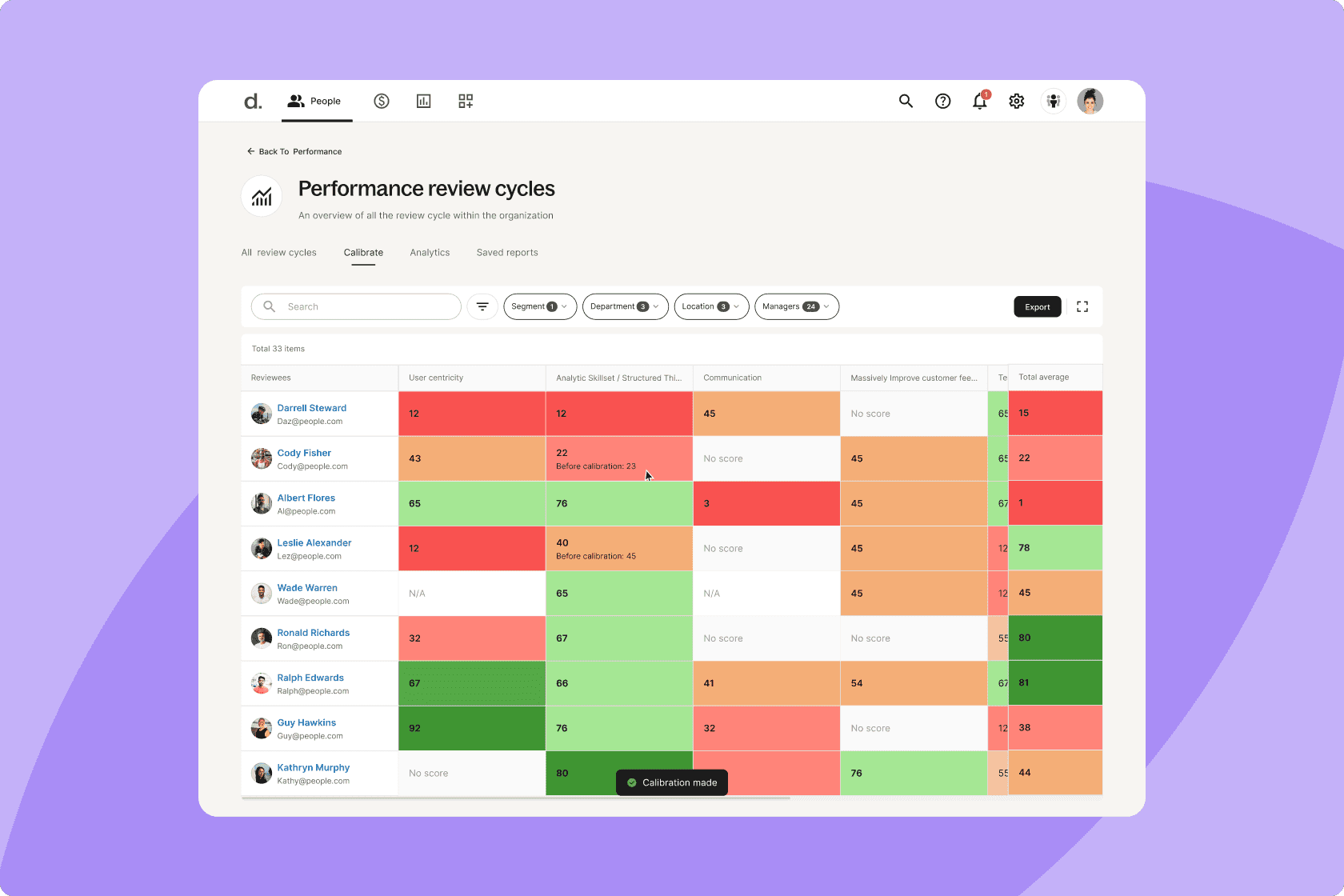
Identify skills gaps with Deel
Running all 12 manually isn't realistic — here's what changes when you automate
The 12 review types above cover every meaningful moment in the employee lifecycle. But knowing which ones to run is only half the challenge. The other half is actually running them consistently, at scale, without rebuilding your process from scratch every cycle.
That's what a dedicated performance management platform makes possible. And it's exactly what Engage was built for.
Engage is Deel HR's performance, learning, and career management suite. It gives HR teams a single system to design, automate, and track every review type covered in this guide — without spreadsheets, disconnected tools, or manual reminders.
What automation looks like in practice
| Category | What Engage provides |
|---|---|
| Flexible review design | Qualitative and quantitative questions, customizable rating scales, question library curated by Deel's People team and L&D experts, weighted questions or reviewer groups for multi-rater cycles |
| Control and configuration | Advanced anonymity settings, customizable visibility and participation rules, role-based permissions for admins, ability to extend deadlines or change task owners, create-your-own templates for repeatable cycles, and optional calibration steps |
| Powerful workflow automation | Automated scheduling tied to key triggers (e.g., hire date), auto-generated tasks on each participant's home page, automated reminders for reviewers and managers, integrations with other Deel modules for pay, growth, and analytics |
| Insights and reporting | Results visualization (radar charts, 9-box grids), unified dashboards with filtering by location, team, and department, manager and manager-of-managers views, option to share or withhold results from participants |
| Seamless participant experience | Open tasks on home pages for all participants (calibrators, reviewers, and reviewees), consistent experience across all worker types (employees, contractors, EOR) |
| Integrated talent ecosystem | Links to compensation, growth, and analytics modules, AI feedback helper to improve written feedback, and performance review summaries to support end-of-cycle discussions |
We were drowning in spreadsheet reviews, a big mess that was a drain on time and morale. Engage is how we turn that painful process into a strategic, joyful one.
—Christian Burri,
Co-founder & CTO, Algrano
Tips to get the most out of your reviews
Engage will house and power every type of performance evaluation in your business. But even with everything running smoothly, you can still maximize the value of your reviews by following some key tips:
Match your review type to your company’s rhythm: Employee feedback should land when the context is fresh, and it’s time to make important comp, promotion, and headcount decisions. So, anchor your annual or biannual reviews to key decision points like fiscal year close, budget cycles, or promotion windows. Layer project-based reviews after major launches or campaigns, and probation reviews at 30/60/90 days.
Stagger cycles around high-pressure periods: Avoid running heavy reviews during peak sales seasons, product launches, or funding rounds. Use lighter-weight check-ins during “crunch” quarters, versus deeper reviews when leaders have the bandwidth to calibrate and act on the data.
Consider adapting the cadence by team, not just by company: Product, Sales, and Support rarely move on the same rhythm. Let some teams run project- or sprint-based reviews, for example, after a release or campaign, while others stick to semiannual cycles.
Combine quantitative signals with qualitative context for better timing decisions: Use scores and completion data to spot where a team might need an extra check-in (e.g., consistently low engagement, rapid growth, or lots of new managers). Then spin up an ad-hoc pulse or focused review in Engage instead of waiting for the “next big cycle.”
Tie review outcomes to company planning: Performance insights should flow straight into salary reviews, recognition programs, and growth opportunities, rather than sitting in a dashboard until the next cycle.
Our employees love having everything accessible in one place—their docs, reviews, time off, and expenses. It’s all in Deel now.
—Dario Valiant Casilli,
Operations Manager, Gomboc AI
Run your first automated review cycle with Engage
Engage gives you the infrastructure to build, deliver, and automate every review type in this guide. And because it's built into Deel, review outcomes flow straight into the rest of your people stack without switching tools, connecting to payroll, learning, career management, and compensation. So every performance decision actually goes somewhere.
See how it works by booking your 30-minute Deel demo today.
Engage has everything. We went from cobbling forms together to running reviews, learning, and surveys in one click.
—Lucía Rodriguez,
Head of HR, Ladonware
Live Demo
Get a live walkthrough of the Deel platform
Lorelei Trisca is a Product Marketing Manager at Deel passionate about the future of work and global talent. She drives go-to-market strategy, product launches, and global campaigns, while championing client enablement and product adoption to help teams get more value from the tools they use every day.